Apply distortion effects to warp, shift, and transform images and videos for dynamic artistic visuals using CE.SDK’s effect system.
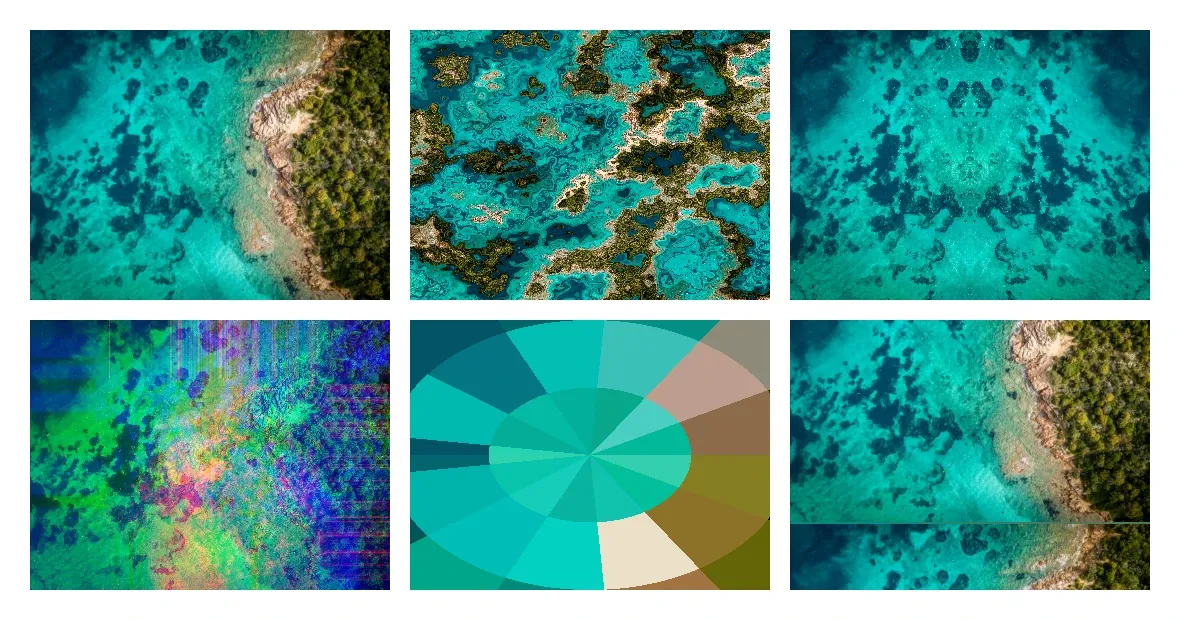
Distortion effects differ from color filters because they change the geometry and spatial arrangement of pixels rather than only changing color values. CE.SDK provides several distortion effect types: liquid warping, mirror reflections, color channel shifting, radial pixelation, TV glitch, corner pin, bulge, wave warp and displacement map.
This guide covers the built-in Android workflow and how to apply and configure each distortion effect programmatically, combine multiple effects on a single block, and manage the effect stack with the block API. To compare the effects side by side, the example places ten copies of the same image in a grid, keeps the first one unaltered and applies one effect to each other cell.
Using the Built-in Distortion UI#
The Android Base Editor exposes distortion effects for supported image and video blocks:
- Select a supported image or video block on the canvas.
- Open Effect in the inspector bar and browse the available distortion effects.
- Choose Liquid, Mirror, Shifter, Radial Pixel, or TV Glitch. Select the applied effect again to open its controls, then adjust the values.
- Preview the result directly on the canvas as you change the controls.
Apply Liquid Effect#
The liquid effect creates organic, flowing distortions that warp the image as if viewed through water. Verify the block supports effects, create the effect with EffectType.Liquid, configure its properties with setFloat(), then attach it with appendEffect().
require(engine.block.supportsEffects(liquidBlock)) { "Image-backed graphic blocks can render distortion effects."}val liquid = engine.block.createEffect(type = EffectType.Liquid)engine.block.setFloat(liquid, property = "effect/liquid/amount", value = 0.5F)engine.block.setFloat(liquid, property = "effect/liquid/scale", value = 1.0F)engine.block.appendEffect(block = liquidBlock, effectBlock = liquid)The liquid effect properties:
effect/liquid/amount(0.0to1.0) - Intensity of the warping.effect/liquid/scale(0.0to1.0) - Scale of the liquid pattern.effect/liquid/time(0.0to1.0) - Fixed variation and randomness input for the liquid pattern. This property does not animate the effect automatically.
Apply Mirror Effect#
The mirror effect reflects the image along a configurable side, creating symmetrical compositions.
val mirror = engine.block.createEffect(type = EffectType.Mirror)engine.block.setInt(mirror, property = "effect/mirror/side", value = 0)engine.block.appendEffect(block = mirrorBlock, effectBlock = mirror)The effect/mirror/side property is an integer: 0 (Left), 1 (Right), 2 (Top), or 3 (Bottom). Set it with setInt().
Apply Shifter Effect#
The shifter effect displaces color channels at an angle, creating chromatic aberration commonly seen in glitch art and retro visuals.
val shifter = engine.block.createEffect(type = EffectType.Shifter)engine.block.setFloat(shifter, property = "effect/shifter/amount", value = 0.3F)engine.block.setFloat(shifter, property = "effect/shifter/angle", value = 0.785F)engine.block.appendEffect(block = shifterBlock, effectBlock = shifter)The shifter effect properties:
effect/shifter/amount(0.0to1.0) - Displacement distance.effect/shifter/angle- Direction of the shift in radians.
Apply Radial Pixel Effect#
The radial pixel effect pixelates the image in a circular pattern from the center, useful for focus effects or stylized treatments.
val radialPixel = engine.block.createEffect(type = EffectType.RadialPixel)engine.block.setFloat(radialPixel, property = "effect/radial_pixel/radius", value = 0.5F)engine.block.setFloat(radialPixel, property = "effect/radial_pixel/segments", value = 0.5F)engine.block.appendEffect(block = radialPixelBlock, effectBlock = radialPixel)The radial pixel effect properties:
effect/radial_pixel/radius- Radius of each row of pixels, relative to the image.effect/radial_pixel/segments- Proportional size of a pixel in each row.
Apply TV Glitch Effect#
The TV glitch effect simulates analog television interference with horizontal distortion and rolling effects.
val tvGlitch = engine.block.createEffect(type = EffectType.TvGlitch)engine.block.setFloat(tvGlitch, property = "effect/tv_glitch/distortion", value = 0.4F)engine.block.setFloat(tvGlitch, property = "effect/tv_glitch/distortion2", value = 0.2F)engine.block.setFloat(tvGlitch, property = "effect/tv_glitch/speed", value = 0.5F)engine.block.setFloat(tvGlitch, property = "effect/tv_glitch/rollSpeed", value = 0.5F)engine.block.appendEffect(block = tvGlitchBlock, effectBlock = tvGlitch)The TV glitch effect properties:
effect/tv_glitch/distortion- Primary horizontal distortion intensity.effect/tv_glitch/distortion2- Secondary distortion layer.effect/tv_glitch/speed- Fixed variance input for the glitch pattern. This property does not animate the effect automatically.effect/tv_glitch/rollSpeed- Fixed vertical offset for the TV bands.
Apply Corner Pin Effect#
The corner pin effect moves the four corners of the block content. Each corner position is relative to the block size: (0, 0) is the upper left and (1, 1) the lower right corner.
// Pull the upper right corner down and the lower right corner up, relative to the block sizeval cornerPin = engine.block.createEffect(type = EffectType.CornerPin)engine.block.setFloat(cornerPin, property = "effect/corner_pin/upperRightY", value = 0.15F)engine.block.setFloat(cornerPin, property = "effect/corner_pin/lowerRightY", value = 0.85F)engine.block.appendEffect(block = cornerPinBlock, effectBlock = cornerPin)The corner pin effect has eight properties, an X and a Y position for each corner: effect/corner_pin/upperLeftX, upperLeftY, upperRightX, upperRightY, lowerLeftX, lowerLeftY, lowerRightX, and lowerRightY. Their defaults keep each corner in place.
Apply Bulge Effect#
The bulge effect magnifies an elliptical area of the block. A negative height pinches the area instead.
// Magnify an ellipse with radii of 120 and 90 design units in the center of the blockval bulge = engine.block.createEffect(type = EffectType.Bulge)engine.block.setFloat(bulge, property = "effect/bulge/centerX", value = 0.5F)engine.block.setFloat(bulge, property = "effect/bulge/centerY", value = 0.5F)engine.block.setFloat(bulge, property = "effect/bulge/horizontalRadius", value = 120F)engine.block.setFloat(bulge, property = "effect/bulge/verticalRadius", value = 90F)engine.block.setFloat(bulge, property = "effect/bulge/height", value = 1.5F)engine.block.appendEffect(block = bulgeBlock, effectBlock = bulge)The bulge effect properties:
effect/bulge/centerXandeffect/bulge/centerY(0.0to1.0) - Center of the ellipse, relative to the block size.effect/bulge/horizontalRadiusandeffect/bulge/verticalRadius- Radii of the ellipse in design units.effect/bulge/height(-4.0to4.0) - Strength. Positive values magnify, negative values pinch, and0does nothing.
Apply Wave Warp Effect#
The wave warp effect moves the pixels of a block with a wave. Both lengths are in design units, so they scale with the block.
// A sine wave 15 design units high with crests 90 design units apartval waveWarp = engine.block.createEffect(type = EffectType.WaveWarp)engine.block.setEnum(waveWarp, property = "effect/wave_warp/waveType", value = "Sine")engine.block.setFloat(waveWarp, property = "effect/wave_warp/height", value = 15F)engine.block.setFloat(waveWarp, property = "effect/wave_warp/width", value = 90F)engine.block.appendEffect(block = waveWarpBlock, effectBlock = waveWarp)The wave warp effect properties:
effect/wave_warp/waveType- Shape of the wave:Sine,Square,Triangle, orSawtooth. Set it withsetEnum().effect/wave_warp/height- Largest displacement in design units.effect/wave_warp/width- Distance between two crests in design units.effect/wave_warp/direction- Direction in which the wave travels, in degrees.0points up and90to the right.effect/wave_warp/phase- Position in the wave cycle, in degrees.
Apply Displacement Map Effect#
The displacement map effect moves each pixel by the value of a second block at the same place. setEffectSource() sets that block, and null removes it. A map value of 0.5 does not move the pixel. Higher and lower values move it up to maxHorizontal and maxVertical design units.
// The map is a hidden image block. The effect still reads it.val map = engine.block.create(DesignBlockType.Graphic)engine.block.setShape(map, shape = engine.block.createShape(ShapeType.Rect))val mapFill = engine.block.createFill(FillType.Image)engine.block.setUri(    block = mapFill,    property = "fill/image/imageFileURI",    value = Uri.parse("https://img.ly/static/ubq_samples/sample_1.jpg"),)engine.block.setFill(map, fill = mapFill)engine.block.setWidth(map, value = 360F)engine.block.setHeight(map, value = 270F)engine.block.setVisible(map, visible = false)engine.block.appendChild(parent = page, child = map)
// Move each pixel up to 20 design units by the luminance of the mapval displacementMap = engine.block.createEffect(type = EffectType.DisplacementMap)engine.block.setEnum(displacementMap, property = "effect/displacement_map/horizontalChannel", value = "Luminance")engine.block.setFloat(displacementMap, property = "effect/displacement_map/maxHorizontal", value = 20F)engine.block.setEnum(displacementMap, property = "effect/displacement_map/verticalChannel", value = "Luminance")engine.block.setFloat(displacementMap, property = "effect/displacement_map/maxVertical", value = 20F)engine.block.setEnum(displacementMap, property = "effect/displacement_map/mapBehavior", value = "Stretch")engine.block.appendEffect(block = displacedBlock, effectBlock = displacementMap)
// Set the map block as the source of the effectengine.block.setEffectSource(effectBlock = displacementMap, source = map)
The displacement map effect properties:
effect/displacement_map/horizontalChannelandeffect/displacement_map/verticalChannel- Map channel that moves the pixels:Red,Green,Blue,Alpha,Luminance,Hue,Lightness,Saturation,Full,Half, orOff.effect/displacement_map/maxHorizontalandeffect/displacement_map/maxVertical- Largest displacement in design units.effect/displacement_map/mapBehavior- How the map covers the block:Center,Stretch, orTile.
Effect Sources#
These rules apply to effect sources:
- Only the displacement map effect reads a source.
- A graphic, text, or group block can be the source. The block that owns the effect can be its own source.
- The effect reads the source without its position and rotation. It also reads a hidden source, so hide a block that you only use as a map.
- The source still draws on the page when it is visible.
- Without a source, the effect does not move any pixels.
setEffectSource()needs theappearance/effectscope on every block that the effect is attached to.
Reading the Source#
getEffectSource() returns the source block, or null when the effect has no source.
val source = engine.block.getEffectSource(effectBlock = displacementMap)Log.i(TAG, "The source is the map: ${source == map}")The source link takes part in the usual block operations:
- Destroying the source clears the link. Undo restores it.
- Undo and redo restore the source.
- Saving and loading a scene keeps the source.
- Duplicating the block that owns the effect keeps the same source. Duplicating a group with the owner and the source links the copy to the copied source.
Handling Errors#
Invalid input to setEffectSource() throws an EngineException. Its code names the problem.
val unsupportedSourceErrorCode = try { // Only the displacement map effect reads a source engine.block.setEffectSource(effectBlock = waveWarp, source = map) null} catch (error: EngineException) { // BLOCK.EFFECT_SOURCE_UNSUPPORTED error.code}val invalidSourceErrorCode = try { // A page cannot be a source engine.block.setEffectSource(effectBlock = displacementMap, source = page) null} catch (error: EngineException) { // BLOCK.EFFECT_SOURCE_INVALID error.code}BLOCK.EFFECT_SOURCE_UNSUPPORTED- The effect is not a displacement map effect.BLOCK.EFFECT_SOURCE_INVALID- The source is a page, scene, fill, shape, or effect block.
Combine Multiple Distortion Effects#
Stack multiple distortion effects on a single block. Effects render in the order they appear in the block’s effect list, from bottom to top, so the liquid warp is applied first and the shifter then displaces color channels on the already-warped result.
val extraShifter = engine.block.createEffect(type = EffectType.Shifter)engine.block.setFloat(extraShifter, property = "effect/shifter/amount", value = 0.2F)engine.block.appendEffect(block = liquidBlock, effectBlock = extraShifter)Use appendEffect() to add an effect to the end of the list, or insertEffect() when an effect must occupy a specific stack index.
List Applied Effects#
Retrieve every effect attached to a block with getEffects(). It returns an ordered list of effect block IDs.
val combinedEffects = engine.block.getEffects(liquidBlock)Use the list when you need to inspect effect order, find an effect before toggling it, or remove an effect by index.
Enable and Disable Effects#
Toggle an effect on and off without removing it using setEffectEnabled(), and query its state with isEffectEnabled(). A disabled effect stays attached and keeps its parameters, but the engine skips it during rendering.
engine.block.setEffectEnabled(effectBlock = extraShifter, enabled = false)val disabledState = engine.block.isEffectEnabled(extraShifter)This is useful for before/after comparisons or temporarily reducing rendering cost.
Remove Effects#
Remove an effect from a block by index with removeEffect(), then call destroy() on the detached effect block when you no longer need it.
engine.block.removeEffect(block = liquidBlock, index = 1)engine.block.destroy(extraShifter)Discover Effect Properties#
Use findAllProperties() to discover every property available on an effect. The distortion properties shown here are numeric, so use setFloat() and getFloat() or setInt() and getInt() according to each property type.
val liquidProperties = engine.block.findAllProperties(liquid)Troubleshooting#
Effect Not Visible#
Confirm the block supports effects with supportsEffects() and that the effect
is enabled with isEffectEnabled(). Effects apply to graphic blocks with image
or video fills, not to scene blocks.
Displacement Map Does Not Move Anything#
Set a source with setEffectSource(), and check that maxHorizontal or
maxVertical is not 0.
Effect Source Errors#
BLOCK.EFFECT_SOURCE_UNSUPPORTED means that the effect does not read a source.
Only a displacement map effect does, and getEffectSource() also throws for
other effects. BLOCK.EFFECT_SOURCE_INVALID means that the block cannot be a
source. Use a graphic, text, or group block.
Unexpected Results#
Verify each parameter against its accepted range:
| Effect | Accepted Values |
|---|---|
| Liquid | amount, scale, and time: 0.0–1.0 |
| Mirror | side: 0–3 |
| Shifter | amount: 0.0–1.0; angle: 0.0–6.3 |
| Radial Pixel | radius: 0.05–1.0; segments: 0.01–1.0 |
| TV Glitch | distortion: 0.0–10.0; distortion2: 0.0–5.0; speed: 0.0–5.0; rollSpeed: 0.0–3.0 |
| Corner Pin | each corner coordinate: -2.0–3.0 |
| Bulge | centerX and centerY: 0.0–1.0; height: -4.0–4.0 |
| Wave Warp | height: -200–200; direction and phase: -360–360 |
| Displacement Map | maxHorizontal and maxVertical: -1000–1000 |
Performance#
Distortion effects are GPU-intensive. Limit the number of stacked effects on a single block, especially on mobile devices, and disable effects you are not actively rendering.
API Reference#
| API | Description |
|---|---|
engine.block.supportsEffects(block=_) |
Checks whether a design block can render effects |
engine.block.createEffect(type=EffectType.Liquid) |
Creates a liquid distortion effect block |
engine.block.createEffect(type=EffectType.Mirror) |
Creates a mirror effect block |
engine.block.createEffect(type=EffectType.Shifter) |
Creates a shifter effect block |
engine.block.createEffect(type=EffectType.RadialPixel) |
Creates a radial pixel effect block |
engine.block.createEffect(type=EffectType.TvGlitch) |
Creates a TV glitch effect block |
engine.block.appendEffect(block=_, effectBlock=_) |
Adds the effect to the end of a block’s effect stack |
engine.block.insertEffect(block=_, effectBlock=_, index=_) |
Inserts an effect at a specific stack index |
engine.block.getEffects(block=_) |
Returns the ordered effects attached to a block |
engine.block.removeEffect(block=_, index=_) |
Removes the effect at the specified stack index |
engine.block.setEffectEnabled(effectBlock=_, enabled=_) |
Enables or disables an effect block |
engine.block.isEffectEnabled(effectBlock=_) |
Returns whether an effect block is enabled |
engine.block.findAllProperties(block=_) |
Lists the properties available on an effect block |
engine.block.setFloat(block=_, property="effect/liquid/amount", value=_) |
Writes a liquid effect float property |
engine.block.getFloat(block=_, property="effect/liquid/amount") |
Reads a liquid effect float property |
engine.block.setFloat(block=_, property="effect/liquid/scale", value=_) |
Writes the liquid pattern scale |
engine.block.getFloat(block=_, property="effect/liquid/scale") |
Reads the liquid pattern scale |
engine.block.setFloat(block=_, property="effect/liquid/time", value=_) |
Writes the liquid pattern variation input |
engine.block.getFloat(block=_, property="effect/liquid/time") |
Reads the liquid pattern variation input |
engine.block.setInt(block=_, property="effect/mirror/side", value=_) |
Writes the mirror side property |
engine.block.getInt(block=_, property="effect/mirror/side") |
Reads the mirror side property |
engine.block.setFloat(block=_, property="effect/shifter/amount", value=_) |
Writes a shifter effect float property |
engine.block.getFloat(block=_, property="effect/shifter/amount") |
Reads a shifter effect float property |
engine.block.setFloat(block=_, property="effect/shifter/angle", value=_) |
Writes the shifter direction in radians |
engine.block.getFloat(block=_, property="effect/shifter/angle") |
Reads the shifter direction in radians |
engine.block.setFloat(block=_, property="effect/radial_pixel/radius", value=_) |
Writes a radial pixel effect float property |
engine.block.getFloat(block=_, property="effect/radial_pixel/radius") |
Reads a radial pixel effect float property |
engine.block.setFloat(block=_, property="effect/radial_pixel/segments", value=_) |
Writes the radial pixel segment size |
engine.block.getFloat(block=_, property="effect/radial_pixel/segments") |
Reads the radial pixel segment size |
engine.block.setFloat(block=_, property="effect/tv_glitch/distortion", value=_) |
Writes a TV glitch effect float property |
engine.block.getFloat(block=_, property="effect/tv_glitch/distortion") |
Reads a TV glitch effect float property |
engine.block.setFloat(block=_, property="effect/tv_glitch/distortion2", value=_) |
Writes the secondary TV glitch distortion |
engine.block.getFloat(block=_, property="effect/tv_glitch/distortion2") |
Reads the secondary TV glitch distortion |
engine.block.setFloat(block=_, property="effect/tv_glitch/speed", value=_) |
Writes the TV glitch variance input |
engine.block.getFloat(block=_, property="effect/tv_glitch/speed") |
Reads the TV glitch variance input |
engine.block.setFloat(block=_, property="effect/tv_glitch/rollSpeed", value=_) |
Writes the TV glitch vertical offset |
engine.block.getFloat(block=_, property="effect/tv_glitch/rollSpeed") |
Reads the TV glitch vertical offset |
engine.block.destroy(block=_) |
Destroys a detached or unused effect block |
engine.block.createEffect(type=EffectType.CornerPin) |
Creates a corner pin effect block |
engine.block.createEffect(type=EffectType.Bulge) |
Creates a bulge effect block |
engine.block.createEffect(type=EffectType.WaveWarp) |
Creates a wave warp effect block |
engine.block.createEffect(type=EffectType.DisplacementMap) |
Creates a displacement map effect block |
engine.block.setFloat(block=_, property="effect/corner_pin/upperRightY", value=_) |
Writes a corner position, relative to the block size |
engine.block.getFloat(block=_, property="effect/corner_pin/upperRightY") |
Reads a corner position |
engine.block.setFloat(block=_, property="effect/bulge/height", value=_) |
Writes the bulge strength |
engine.block.getFloat(block=_, property="effect/bulge/height") |
Reads the bulge strength |
engine.block.setFloat(block=_, property="effect/wave_warp/height", value=_) |
Writes the largest wave displacement in design units |
engine.block.getFloat(block=_, property="effect/wave_warp/height") |
Reads the largest wave displacement |
engine.block.setEnum(block=_, property="effect/wave_warp/waveType", value=_) |
Writes an option property of an effect |
engine.block.setFloat(block=_, property="effect/displacement_map/maxHorizontal", value=_) |
Writes the largest displacement in design units |
engine.block.create(blockType=DesignBlockType.Graphic) |
Creates the graphic block for the map |
engine.block.createShape(type=ShapeType.Rect) |
Creates the rect shape of the map |
engine.block.setShape(block=_, shape=_) |
Gives the map its shape |
engine.block.createFill(fillType=FillType.Image) |
Creates the image fill of the map |
engine.block.setUri(block=_, property="fill/image/imageFileURI", value=_) |
Sets the image of the map |
engine.block.setFill(block=_, fill=_) |
Attaches the fill to the map |
engine.block.setWidth(block=_, value=_) |
Sets the width of the map |
engine.block.setHeight(block=_, value=_) |
Sets the height of the map |
engine.block.setVisible(block=_, visible=_) |
Hides a block that you only use as a map |
engine.block.appendChild(parent=_, child=_) |
Adds the map to the page |
engine.block.setEffectSource(effectBlock=_, source=_) |
Sets or removes the block that a displacement map effect reads |
engine.block.getEffectSource(effectBlock=_) |
Gets the block that a displacement map effect reads |
Available Distortion Effects#
| Effect | EffectType |
Description | Key Properties |
|---|---|---|---|
| Liquid | EffectType.Liquid |
Flowing, organic warping | amount, scale, time |
| Mirror | EffectType.Mirror |
Reflection along a side | side (0=Left, 1=Right, 2=Top, 3=Bottom) |
| Shifter | EffectType.Shifter |
Chromatic aberration | amount, angle |
| Radial Pixel | EffectType.RadialPixel |
Circular pixelation | radius, segments |
| TV Glitch | EffectType.TvGlitch |
Analog TV interference | distortion, distortion2, speed, rollSpeed |
| Corner Pin | EffectType.CornerPin |
Moves the four corners | upperLeftX to lowerRightY |
| Bulge | EffectType.Bulge |
Magnifies or pinches an ellipse | centerX, centerY, horizontalRadius, verticalRadius, height |
| Wave Warp | EffectType.WaveWarp |
Moves pixels with a wave | waveType, height, width, direction, phase |
| Displacement Map | EffectType.DisplacementMap |
Moves pixels by the values of a second block | horizontalChannel, maxHorizontal, verticalChannel, maxVertical, mapBehavior |
Next Steps#
- Apply a Filter or Effect - Learn the foundational effect APIs.
- Blur Effects - Apply blur techniques for depth and focus effects.
- Color Effects - Remap the colors of a block.
- Wipe Effects - Hide parts of a block.