


IMG.LY vs. DesignCombo
Looking to embed professional-grade video and design editing directly into your platform? IMG.LY provides the flexibility, scalability, and customization to match your vision, making CreativeEditor SDK a powerful alternative to DesignCombo.
What makes IMG.LY the best DesignCombo alternative?
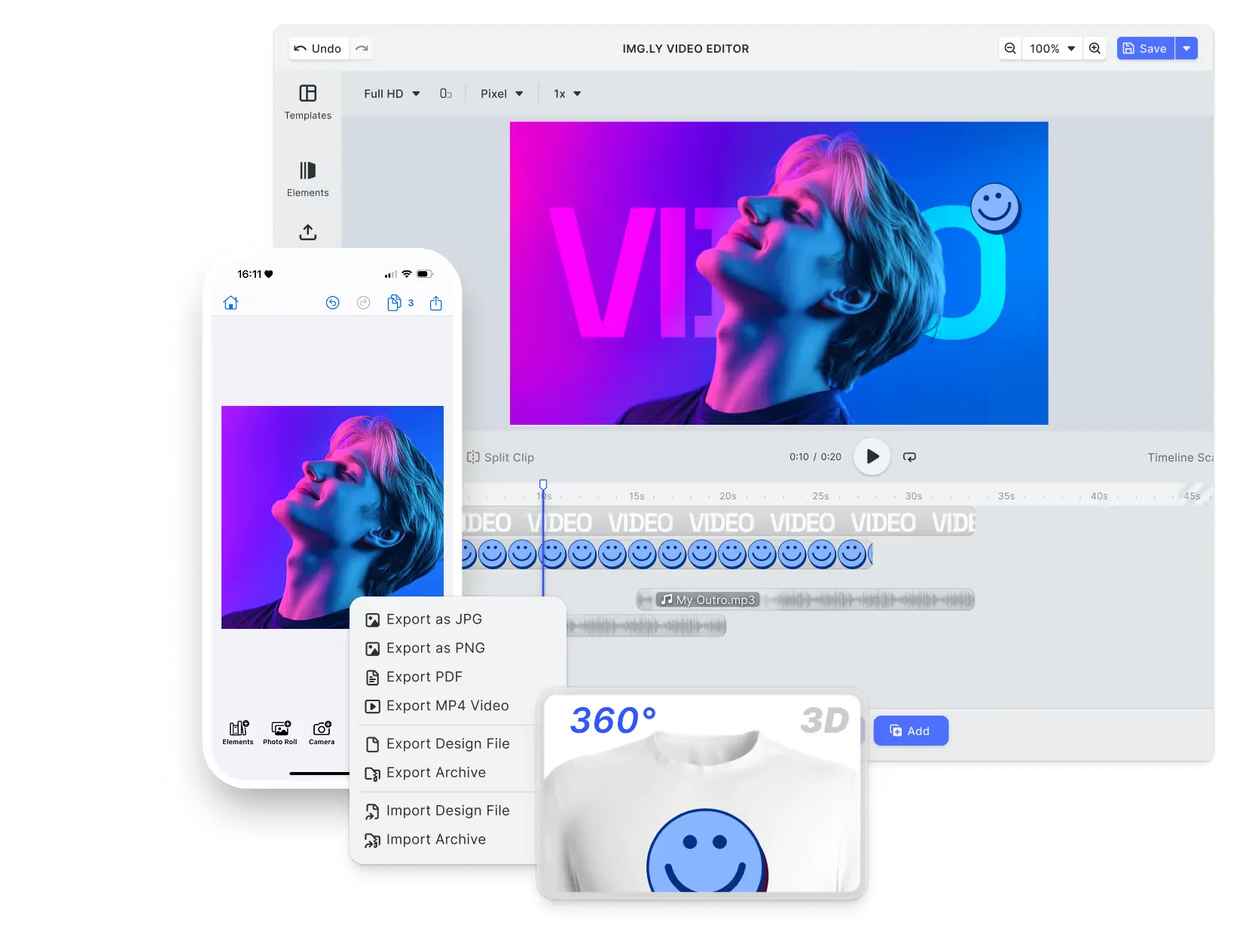
Advanced video and design editing
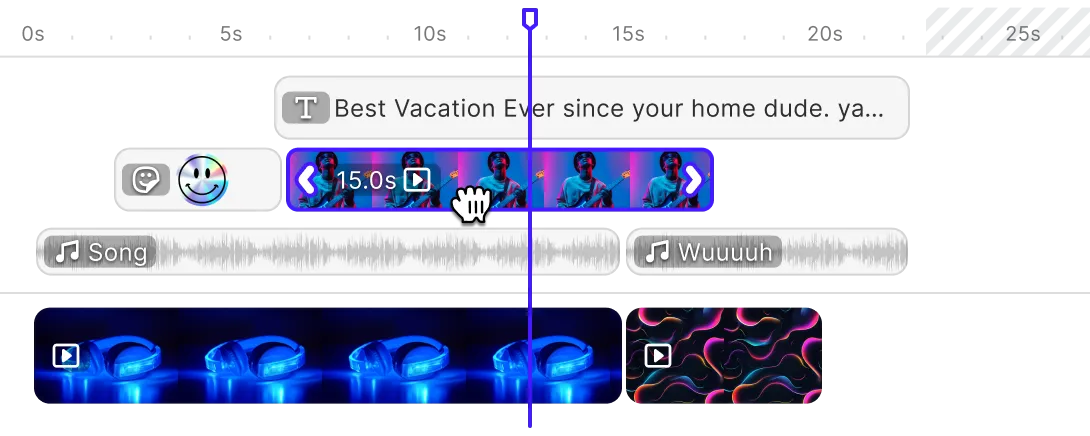
Bring professional-grade editing to every media type with timeline-based video control, vector and layout design tools, keyframe animation, and CMYK-ready export.
Headless integration & UI customization
Drop in ready-to-use editors or go headless to build automated creative workflows. IMG.LY’s modular architecture gives teams complete control.
Cross-platform SDK suite
Deploy consistent creative experiences across Web, iOS, Android, React Native, Flutter, and Node.js. IMG.LY’s unified creative engine ensures native performance.
AI & creative automation
Scale content production with built-in AI features and templating APIs. Generate personalized designs and videos from data, automate asset variations.
Trusted by 100+
industry leaders















What our clients say about us
Integrating IMG.LY’s editor meant we didn’t have to build or maintain a complex editing layer ourselves. That kept our team focused on our core AI ad engine and saved us countless development hours — while still giving our customers the ability to polish and customize creatives at scale.
Hikari Senju
CEO, Omneky

With IMG.LY we built a central creative portal that now powers over 140 dealer campaigns across multiple automotive brands. Before this, asset creation was slow and inconsistent.
Martin Röhr
Product Owner, Digitas

By embedding IMG.LY’s editor we were able to hit key RFP requirements and deliver a template-based creative experience that now serves 1,000+ customers. It helped us win more deals and exceed enterprise expectations without needing to hire dedicated design teams.
Rob Driscoll
Director of PM, Optimizely

Since integrating IMG.LY’s editor, we now deliver 30,000+ ad creatives per month, dramatically shorten time-to-launch, and help our clients cut design spend by up to $10,000 per month.
Logan Welbaum
Founder, Plai

Our customers create over a million personalized postcards each year choosing from over hundreds of templates with IMG.LY’s SDK. It’s the only solution that allows us to build our own specialized, on-brand UI that integrates seamlessly with our platform.
Jeanine Zaalberg
Product Manager, SwissPost

From a developer’s perspective, the most powerful feature of the photo editor is the integration process. It was completely flawless, quick, and easy to integrate.
Stefano Fornari
CTO, Funambol

We compared IMG.LY SDK with other solutions and found that it would be the best fit for us since it provides all the features that are crucial for our use case.
Carem Pereira
SCRUM Manager, HP

IMG.LY vs. DesignCombo at a glance
| Feature | IMG.LY | DesignCombo | Notes |
|---|---|---|---|
| Primary Use Case | End-to-end creative editing SDK for photo, video, and design. Provides pre-built editors, modular SDK components and headless integration options for workflows including social, marketing, print-on-demand and automated content creation. | React SDK for building video and graphic editors, now developed as OpenVideo Editor after the DesignCombo repository moved to the openvideodev organisation. The designcombo.dev site no longer resolves. | IMG.LY supports both interactive editing and headless automation; DesignCombo offers a component framework requiring deeper customization. |
| Target Audience | Product and engineering teams needing a production-ready creative editing SDK that integrates into existing apps and workflows, enabling both visual creator experiences and scalable content generation. | Developer teams with strong React expertise building bespoke video and design tools where custom editor architecture is a priority. | IMG.LY targets both creators and developers; DesignCombo focuses on deep technical customization via React. |
| Technical Approach | Modular SDK architecture including UI components, engine API and templating system. Runs on Web, iOS, Android, React Native, Flutter and Node.js. Enables real-time editing and automation. | React and browser only. The project moved off Remotion and now renders with PixiJS v8 through its own engine package, on Next.js 15. | IMG.LY offers cross-platform infrastructure; DesignCombo emphasizes browser/React architecture. |
| Creative Automation | Headless mode and engine APIs support batch processing, data-merge workflows and programmatic rendering of personalized content at scale. | Programmatic rendering from React, which can be extended to large-scale generation on your own cloud infrastructure. | IMG.LY supports both interactive editing and automation; DesignCombo specialises in code-driven automation. |
| Templating & Dynamic Editing | Template system designed for both end-users and automation: smart placeholders, brand constraints, role-based permissions, and API-driven personalization. Same templates apply to interactive editors and batch workflows. | Templates manifest as React components with props for dynamic behaviour. Ideal for programmatic generation of content, but interactive template editing UI must be built. | IMG.LY unifies interactive template editing and automated workflows; DesignCombo emphasises code-based templating. |
| Advanced Video Editing | Full-featured video editing engine with timeline-based control, transitions, trimming, keyframe animations, effects, audio synchronization, text overlays, and multi-format export. Frame-accurate editing with 60fps real-time preview and GPU acceleration for professional-grade workflows across web, mobile, and desktop environments. | Timeline-based video composition in React, rendered through PixiJS rather than the Remotion model the project originally used. | IMG.LY provides complete interactive video editing out of the box. DesignCombo enables code-driven video generation and requires building interactive editing interfaces manually. |
| Advanced Design Editing | Comprehensive design capabilities with support for vector and raster editing, layout grids, typography tools, shapes, masks, blending modes, layer management, and precise alignment controls. Enables creation of print-ready, social, and marketing materials with features like CMYK export, bleed, and smart snapping. | Provides modular React components and APIs to build custom design interfaces for editing text, shapes, and images on a canvas. No built-in layout system, asset management, or export tooling. Developers must assemble all design interactions, rendering logic, and editing constraints manually. | IMG.LY includes a full design editor with layout and vector tools. DesignCombo provides primitives for building custom design tools from scratch. |
| AI Capabilities | Built-in generative and analytic AI tools: background removal, text-to-image/video, image-to-image transformation, variant creation. Supports custom AI models via plugin API and accessible both in UI and via headless workflows. | Now positioned as an open-source AI video editor, with prompt-driven actions in the product such as applying a style, removing silences and dead air, and cutting a short-form reel. These are editing actions rather than a plugin API you extend with your own models. | Both now ship AI in the product. IMG.LY exposes it through a plugin API you can point at your own models and call headlessly; OpenVideo offers prompt-driven editing actions inside its editor. |
| User Interface | Ships with a production-ready, configurable UI: drag-and-drop tools, panels, asset browsers and live preview. Full theming and layout control allow branding consistency. | Does not include a UI by default. Developers have to build all interface elements using the provided React components. | IMG.LY includes the UI; DesignCombo requires building the UI from primitives. |
| White-labelling | Fully unbranded SDK: complete control over colours, fonts, icons and layout so the editing experience fits the host application. | White-labelling achieved because developers build the UI entirely, branding is fully controlled but also fully implemented by the team. | Both allow branding control; IMG.LY offers branding out of the box. |
| Interactive Editing | Designed primarily for interactive editor experiences with visual controls and real-time feedback, while also offering headless APIs for automation and batch generation. | Optimised for programmatic generation and code-defined workflows. Interactive editing requires significant UI development effort. | IMG.LY supports both interaction and automation; DesignCombo emphasizes programmatic generation. |
| Component Architecture | SDK modules let you include only what’s needed (photo, design, video) and combine them, while preserving efficient bundle size and performance. | Architecture splits into npm packages where developers compose state, timeline and UI logic manually, choosing how components interconnect. | Both modular; IMG.LY supplies ready modules, DesignCombo demands full assembly. |
| React Integration Depth | Integrates via SDK components in React apps with standard props and callbacks, without imposing deep coupling or requiring major architectural changes. | Built around React paradigms: editing logic, state management and rendering all happen through React components and hooks. Requires deeper React architecture alignment. | IMG.LY is easier to integrate into existing React apps; DesignCombo is React-native by design. |
| Cross-Platform Support | Multi-platform support across Web, iOS, Android, React Native, Flutter, Electron and Node.js. Common engine ensures consistent rendering and supports offline workflows where applicable. | Built for the web browser via React. Can be wrapped in mobile or desktop containers but lacks dedicated native mobile SDKs. | IMG.LY supports native mobile and desktop; DesignCombo is primarily browser-based. |
| Customisability | Extensive customization through theming APIs, configuration settings and plugins. Tools may be enabled/disabled, logic injected, workflows extended without modifying core SDK. | Unlimited code-level control: every part of the editor can be replaced or extended via React, but the team must build significant parts themselves. | IMG.LY balances customization and stability; DesignCombo offers total control at the cost of more development effort. |
| Extensibility | Designed with extensibility in mind: plugin architecture, engine API, backend integration points, asset workflows, AI plugin support, cross-platform from browser to server. | Fully extensible via React/TypeScript: teams create new components, integrate external libraries and extend functionality manually. | IMG.LY provides structured extensibility; DesignCombo focuses on developer-led extensibility. |
| Ease of Integration | Low barrier to entry: JavaScript/TypeScript developers can integrate quickly. Documentation, examples, ready SDKs across frameworks and full REST + WebSocket APIs for backend workflows. | Integration via React application architecture: connects to state management (Redux, Zustand), routing and data layers. Backend integration must be built manually. | IMG.LY supports both frontend and backend integration with less friction. DesignCombo requires deeper architecture work. |
| Rendering Approach | Flexible rendering architecture for different workflows: client-side editing uses device GPUs and local data; server-side rendering uses the CE.SDK Renderer for automation on controlled Node.js environments. A single engine ensures consistent, pixel-identical output across both interactive and batch rendering. | Browser rendering through PixiJS v8 via the project’s own engine package. Server-side rendering is yours to arrange. | IMG.LY supports interactive and automated rendering across platforms; DesignCombo, now OpenVideo, is browser-first and leaves server infrastructure to you. |
| Mobile Performance | Native SDK for iOS and Android with touch-friendly controls, gesture support, optimized memory and GPU usage. Maintains responsive editing even on mid-range devices. | Web-based performance relies on browser and WebGL; developers must optimise mobile UX and gestures manually. | IMG.LY offers optimized mobile editing; DesignCombo is constrained by browser/mobile wrappers. |
| Scalability | Made for production at scale: client-side editing distributes compute among devices; server-side rendering and automation pipelines scale workforce. Trusted in high-volume deployments. | Scalable for rendering tasks (via distributed servers), but interactive scaling depends on browser performance and architecture built by the team. | IMG.LY ready for large-scale creator apps; DesignCombo capable of scale but depends heavily on custom architecture. |
| Storage & Data Ownership | Flexible storage architecture: client-side only, self-hosted or cloud deployments. Data remains under customer control; optional server workflows. | Data persistence and export workflows are custom built by the developer. No built-in storage or asset pipeline. | IMG.LY supports full control of data flow; DesignCombo leaves storage and ownership to the implementer. |
| Asset Management | Built-in asset library system with search, filtering, tagging, and integrations (e.g., Getty Images, Unsplash, Airtable). Custom asset sources via API supported. | No built-in asset library; developers must build asset upload, search, filtering and browsing functionality themselves. | IMG.LY offers asset management; DesignCombo requires custom asset infrastructure. |
| Extensive File Format Support | Broad design and media format support: import PSD, AI, IDML, SVG, PNG, JPEG, video formats; export PNG, JPEG, WebP, PDF, MP4 and print-ready CMYK workflows. | Browser/React environment format support: mostly web formats (PNG, JPEG, WebM, MP4) and developer-implemented export options. | IMG.LY supports professional formats; DesignCombo supports typical web-based formats and requires custom export. |
| Production Readiness | Proven across enterprise apps and major creative workloads. Continuous updates, quality assurance, security compliance and cross-platform validation built in. | Framework stability provided, but production readiness depends heavily on the implementation quality and team expertise. | IMG.LY is enterprise-grade out of the box; DesignCombo demands rigorous custom implementation. |
| Offline Capabilities | Full offline editing and export support when SDK is initialized. Ideal for mobile and desktop applications with limited connectivity. | Limited offline support: browser caching is possible, but full offline workflows and offline sync require custom development. | IMG.LY supports full offline workflows; DesignCombo offers limited offline capabilities. |
| Clear Pricing Model | Enterprise licensing based on usage, scale and platform support. Transparent terms and an evaluation option. | Dual licence: free for individuals, non-profits and organisations with up to three employees, with a company licence required above that. Commercial enquiries go through their team. | IMG.LY offers predictable enterprise licensing; DesignCombo’s cost includes development overhead. |
| Community & Support | Onboarding, solution engineers, documentation, examples and enterprise support. Powers over 500 million creations per month. | Community-driven documentation and examples. Focused on React developer base, with less emphasis on enterprise support. | IMG.LY offers large-scale adoption and dedicated enterprise support; DesignCombo relies on developer community. |
Key capabilities
Learn more about some of the functionalities of IMG.LY’s SDK.
Editing
Printing





Templating
Text variables.
Enable mass personalization and creative automation by embedding variables.
Placeholders & lockable designs.
Constrain templates to guide your users’ design and ensure brand consistency.
Configurable presets.
Enforce a consistent aesthetic across all creations by using preset filters, adjustments, fonts, and crop ratios.
Customizability
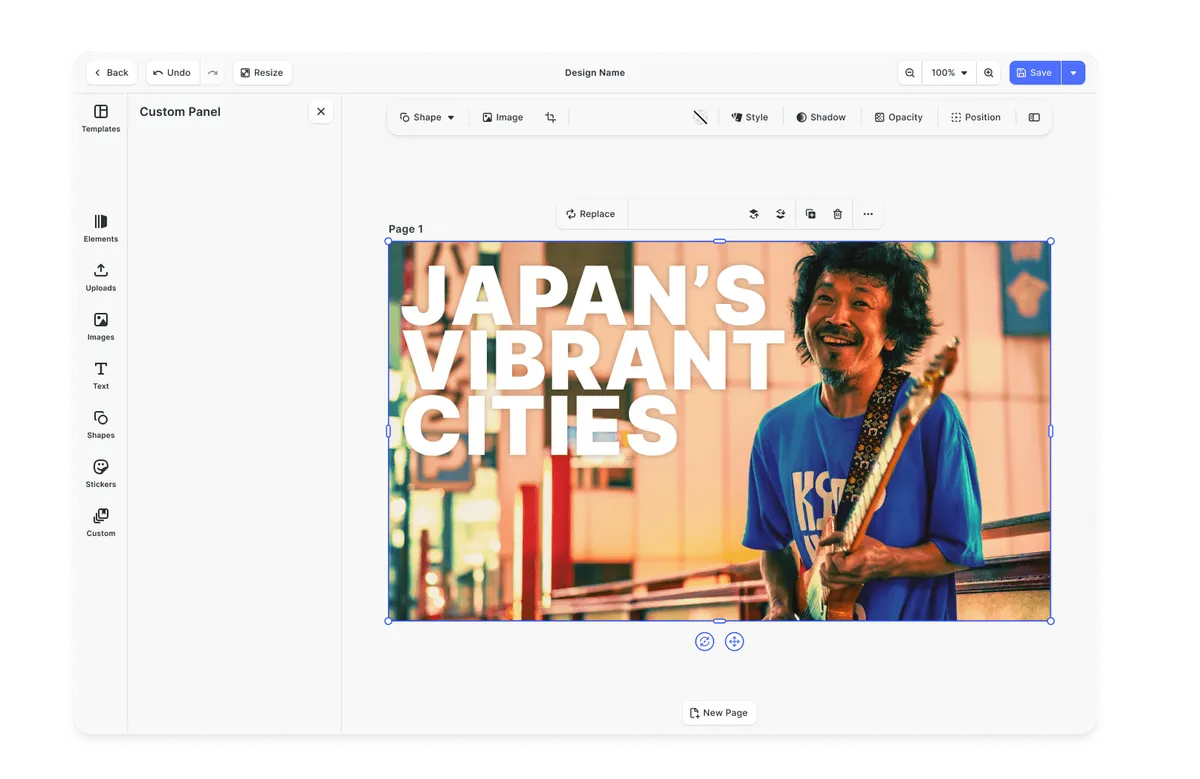
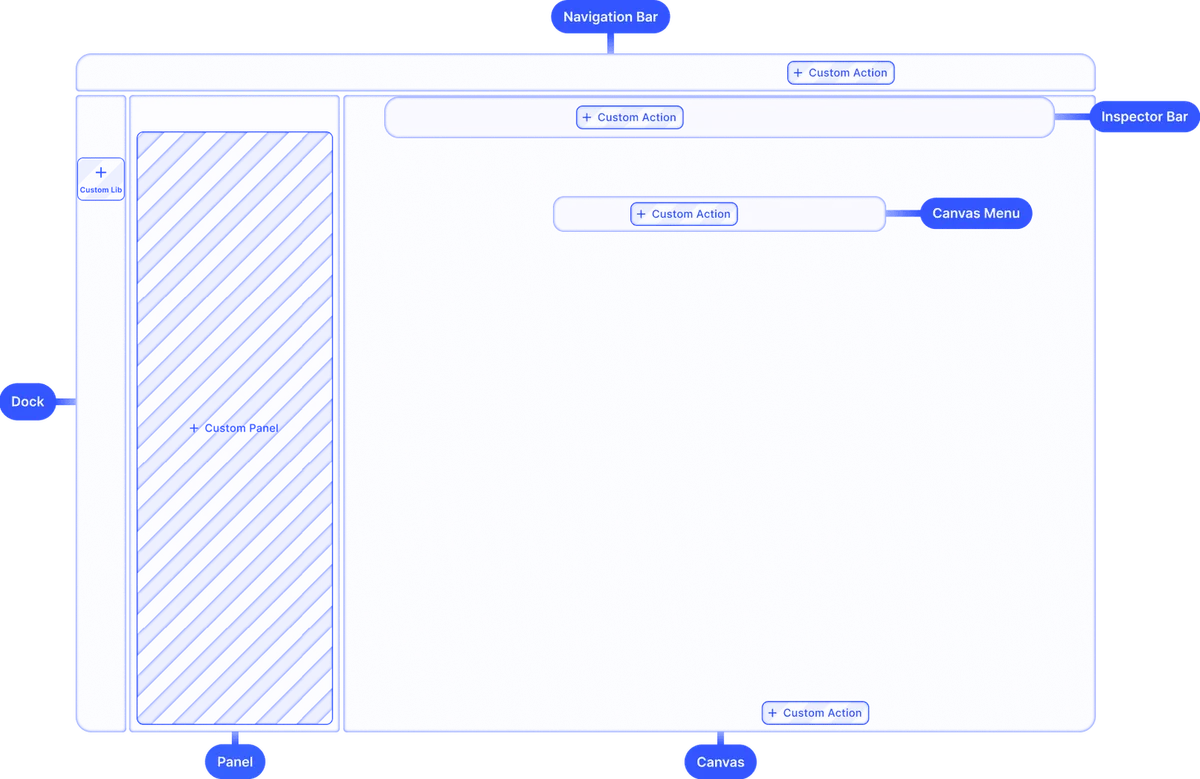
Build custom UIs.
Use the headless API powering all creative operations to implement an entirely custom UI.
Theming.
Theme the editor to match your app.
Media libraries.
Set up custom libraries that are easily sortable.
Toolbar customization.
Reposition toolbar elements, change icons, or rename tools to fit your use case.
Internationalization.
Add support for additional languages, and customize any button label.
Export options.
Export designs in JPG, PNG, or PDF with custom quality, page ranges, and dimensions.
Check out other use cases
Learn more about related solutions.
Apparel Designer
Whether t-shirts, hoodies or caps, build for any use case, deploy on any platform.
Get in touch
Contact our sales team to learn more about licensing options and get access to our AI plugins for CE.SDK.
FAQs
IMG.LY delivers a fully featured set of professional editing tools, including timeline-based video control, vector and layout design tooling, keyframe animation, and CMYK-ready export, all of which can be embedded directly into applications. DesignCombo, in contrast, provides modular React components focused on custom editor construction using the Remotion framework, meaning developers must build most of the editing interface themselves. This makes IMG.LY more turnkey for production environments, while DesignCombo is geared toward teams wanting deep React-centric control.
IMG.LY supports both ready-to-use editors and headless APIs that let teams automate workflows and build custom creative pipelines without UI constraints. DesignCombo emphasizes a component framework where the UI, state management, and interactions are assembled manually in React. As a result, IMG.LY provides smoother paths for both interactive and automated creative experiences out of the box, whereas DesignCombo offers flexibility with greater development investment.
IMG.LY's SDK suite supports a wide range of environments, including web, iOS, Android, React Native, Flutter, Electron, and server contexts, with consistent rendering and performance. By contrast, DesignCombo is primarily built for browser-based React environments and lacks dedicated native SDKs. This makes IMG.LY a stronger choice for products that need uniform experiences across mobile, desktop, and web.
IMG.LY includes a templating system with smart placeholders, brand constraints, and APIs that support batch rendering and personalized content generation. These features work in both interactive editors and automated pipelines. DesignCombo also supports dynamic content via React components but doesn't provide an integrated system for interactive templates or headless batch workflows, placing more responsibility on the developer to implement automation logic.
IMG.LY ships with a production-ready, configurable UI that includes drag-and-drop tools, panels, asset browsers, and live preview, all themeable, so the editor carries your brand. DesignCombo, however, doesn't include a default editor UI, so developers assemble their own interface from low-level React components. As a result, IMG.LY accelerates productization with an out-of-the-box experience, while DesignCombo provides maximum code-level control at the cost of additional UI engineering.
IMG.LY includes built-in generative and analytic AI tools such as background removal, text-to-image/video generation, and image-to-image transformation, all usable in both interactive editing and programmed workflows. DesignCombo does not provide native AI tools, meaning teams must integrate third-party AI services manually if they want similar capabilities. This makes IMG.LY a more complete solution for creative automation that uses AI.
IMG.LY offers a built-in asset library system with features like search, filtering, tagging, and integration with external providers (e.g., Unsplash, Getty Images), plus broad file format support for import and export (PSD, AI, IDML, SVG, PNG, MP4, PDF, CMYK). DesignCombo lacks a native asset management system and depends on developers to implement upload, browsing, and export functionality, making IMG.LY a better fit for enterprise creative products.