



Transitions
Blend adjacent video clips into each other with clip-to-clip transitions such as cross-fades, pushes, and wipes.
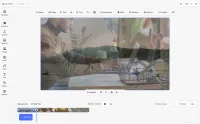
Transitions turn a hard cut between two clips into a smooth scene change. CE.SDK ships a library of clip-to-clip transition presets — cross-fades, pushes, slides, and wipes — that users apply directly in the timeline, with real-time preview on the canvas. Each transition belongs to the outgoing clip and overlaps it with the following clip for a configurable duration, so pacing stays fully under the editor’s control.
Key Features
-
Pre-Configured Transition Library
Choose from a wide range of presets, including cross-fade, cross-blur, cross-spin, cross-zoom, push, slide, wipe, color wipe, gradient fade, clock wipe, fade to black, and fade to white. Every preset is production-ready, so polished scene changes are one click away.
-
Timeline-Native Workflow
Transitions live between clips on the timeline. Hovering the boundary between two adjacent clips brings up the transition control, and the applied transition renders as a marker users can reopen and tweak at any time.
-
Configurable Duration and Style
Adjust how long two clips overlap, and fine-tune per-preset properties such as direction and color to match the pacing and look of the composition.
-
Full API Control
Everything the timeline UI does is also available programmatically through the engine API — create, configure, or remove transitions headlessly, or build your own custom transition UI on top.
How to Use Transitions
In the timeline, hover the boundary between two adjacent clips and select the transition control to open the transition panel. Pick a preset to apply it, then adjust its duration and type-specific properties such as direction or color. Press play to preview the result on the canvas in real time. To change or remove a transition later, select its marker between the clips and pick a different preset — or none.
Transitions turn a hard cut between two clips into a smooth scene change. CE.SDK ships a library of clip-to-clip transition presets — cross-fades, pushes, slides, and wipes — that users apply directly in the timeline, with real-time preview on the canvas. Each transition belongs to the outgoing clip and overlaps it with the following clip for a configurable duration, so pacing stays fully under the editor’s control.
Key Features
-
Pre-Configured Transition Library
Choose from a wide range of presets, including cross-fade, cross-blur, cross-spin, cross-zoom, push, slide, wipe, color wipe, gradient fade, clock wipe, fade to black, and fade to white. Every preset is production-ready, so polished scene changes are one click away.
-
Timeline-Native Workflow
Transitions live between clips on the timeline. Hovering the boundary between two adjacent clips brings up the transition control, and the applied transition renders as a marker users can reopen and tweak at any time.
-
Configurable Duration and Style
Adjust how long two clips overlap, and fine-tune per-preset properties such as direction and color to match the pacing and look of the composition.
-
Full API Control
Everything the timeline UI does is also available programmatically through the engine API — create, configure, or remove transitions headlessly, or build your own custom transition UI on top.
How to Use Transitions
In the timeline, hover the boundary between two adjacent clips and select the transition control to open the transition panel. Pick a preset to apply it, then adjust its duration and type-specific properties such as direction or color. Press play to preview the result on the canvas in real time. To change or remove a transition later, select its marker between the clips and pick a different preset — or none.
Related Demos
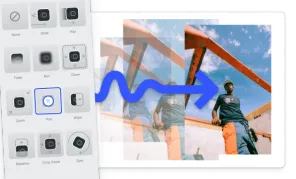
Animations
Effortlessly add animations to any element in CE.SDK videos using our extensive preset library.
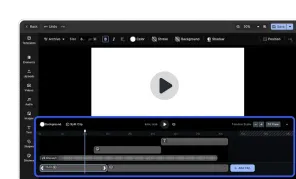
Video Editor UI
Take the VideoEditor for a test run and see how powerful editing features meet seamless and intuitive design. All with fully customizable UI and asset library.
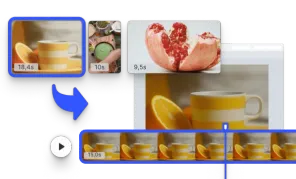
Start with a Video
Initialize the editor with a video matching the page size.