Remap the colors of a block with the tint, fill, tritone, levels, invert, threshold and shift channels effects.
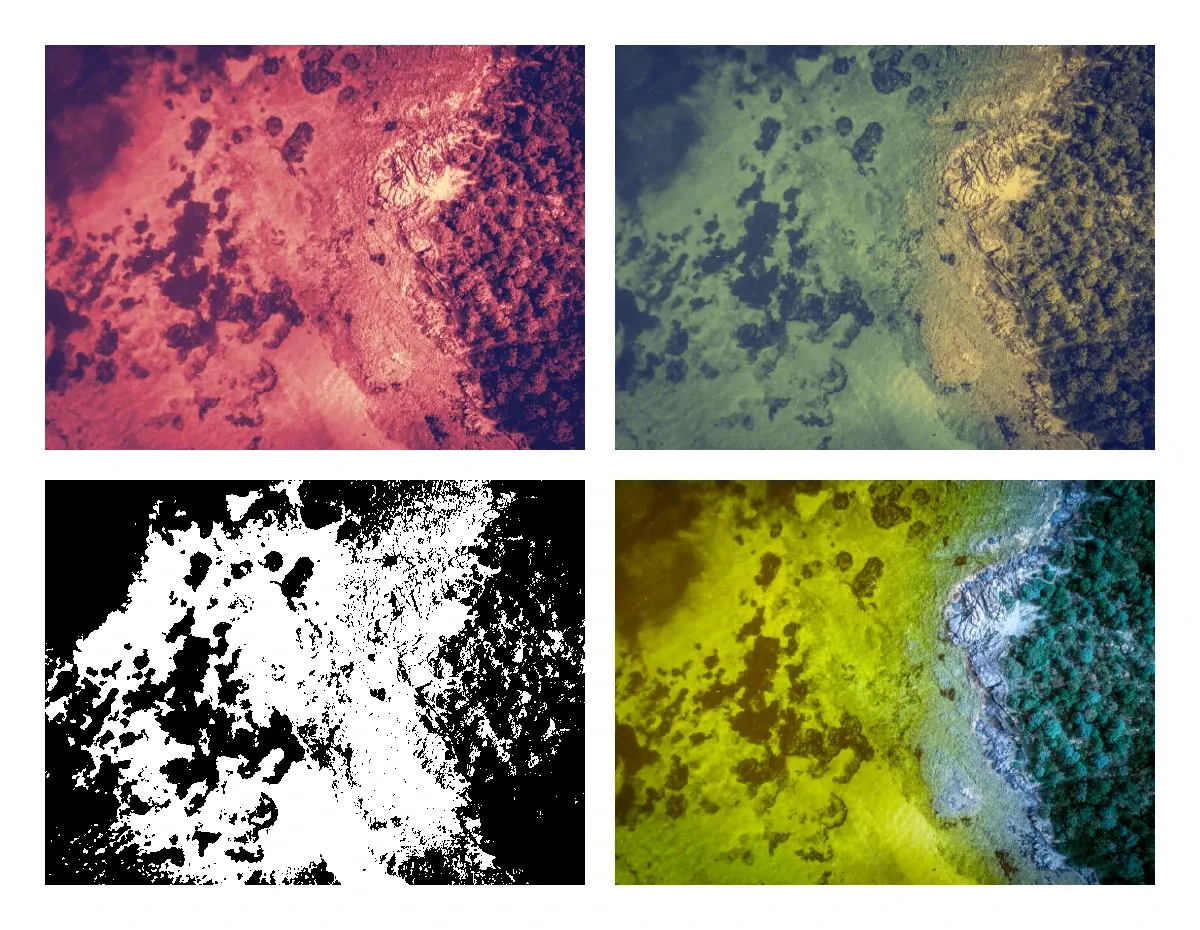
Color effects use the same effect API as all other effects. You create an effect with createEffect(_:), set its properties and add it to a block with appendEffect(_:effectID:). Each color effect changes the color of every pixel and leaves the pixel where it is. Scenes that use these effects do not open in earlier versions of CE.SDK. For the general effect API, see Apply a Filter or Effect.
The Color Effects#
The Supported Filters and Effects guide lists the properties and default values of every type.
| Type | What it does |
|---|---|
.tint |
Maps black and white to two colors, and mixes the result into the block |
.fill |
Replaces the colors with one color, and keeps the coverage of each pixel |
.tritone |
Maps dark, middle and light values to three colors |
.levels |
Remaps the input range, the output range and the gamma of the channels |
.invert |
Inverts one channel, or a group of channels in the RGB, HSL or YIQ color space |
.threshold |
Turns every pixel black or white at a luminance level |
.shiftChannels |
Fills each channel with a value from another channel |
Creating the Image Blocks#
We add four copies of one image to the page. Each section below adds its effects to one of these blocks.
// Adds a 360 x 270 image block to the page at a positionfunc addImageBlock(x: Float, y: Float) throws -> DesignBlockID {  let block = try engine.block.create(.graphic)  try engine.block.setShape(block, shape: engine.block.createShape(.rect))  let fill = try engine.block.createFill(.image)  try engine.block.setURL(fill, property: "fill/image/imageFileURI", value: imageURL)  try engine.block.setFill(block, fill: fill)  try engine.block.setWidth(block, value: 360)  try engine.block.setHeight(block, value: 270)  try engine.block.setPositionX(block, value: x)  try engine.block.setPositionY(block, value: y)  try engine.block.appendChild(to: page, child: block)  return block}
let stackBlock = try addImageBlock(x: 30, y: 30)let tintBlock = try addImageBlock(x: 410, y: 30)let thresholdBlock = try addImageBlock(x: 30, y: 320)let shiftBlock = try addImageBlock(x: 410, y: 320)
Stacking Levels and Tritone#
A block applies its effects in the order of its effect list. appendEffect(_:effectID:) adds an effect to the end of the list. Here .levels runs first and maps the input range from 0.1 to 0.9 onto the full range. Then .tritone maps black, mid gray and white to three colors.
// Levels runs first and stretches the input rangelet levels = try engine.block.createEffect(.levels)try engine.block.setFloat(levels, property: "effect/levels/rgbInBlack", value: 0.1)try engine.block.setFloat(levels, property: "effect/levels/rgbInWhite", value: 0.9)try engine.block.appendEffect(stackBlock, effectID: levels)
// Tritone runs second and maps dark, middle and light values to three colorslet tritone = try engine.block.createEffect(.tritone)try engine.block.setColor(tritone, property: "effect/tritone/shadows", color: .rgba(r: 0.1, g: 0.1, b: 0.3, a: 1))try engine.block.setColor(tritone, property: "effect/tritone/midtones", color: .rgba(r: 0.8, g: 0.3, b: 0.4, a: 1))try engine.block.setColor(tritone, property: "effect/tritone/highlights", color: .rgba(r: 1, g: 0.9, b: 0.7, a: 1))try engine.block.appendEffect(stackBlock, effectID: tritone)
Reverse the order and the result changes too, because tritone then reads the original image. getEffects(_:) returns the list in the order the block applies it.
// [levels, tritone]: levels runs firstlet stack = try engine.block.getEffects(stackBlock)print(stack == [levels, tritone]) // trueTo insert an effect at an index, disable it or remove it, see Apply a Filter or Effect.
Tint, Threshold and Shift Channels#
The .tint effect maps the luminance of each pixel onto a gradient between mapBlackTo and mapWhiteTo. amount mixes the input (0) and the tinted color (1). The alpha of both colors is ignored.
// Black maps to a dark blue and white to a warm yellowlet tint = try engine.block.createEffect(.tint)try engine.block.setColor(tint, property: "effect/tint/mapBlackTo", color: .rgba(r: 0.05, g: 0.1, b: 0.35, a: 1))try engine.block.setColor(tint, property: "effect/tint/mapWhiteTo", color: .rgba(r: 1, g: 0.85, b: 0.4, a: 1))try engine.block.setFloat(tint, property: "effect/tint/amount", value: 0.8)try engine.block.appendEffect(tintBlock, effectID: tint)The .threshold effect turns a pixel white when its luminance is at or above level, and black otherwise. level is in the range 0 to 1.
// Pixels with a luminance of 0.45 or more turn white, all others blacklet threshold = try engine.block.createEffect(.threshold)try engine.block.setFloat(threshold, property: "effect/threshold/level", value: 0.45)try engine.block.appendEffect(thresholdBlock, effectID: threshold)The .shiftChannels effect fills each output channel with a value of the input pixel. Set takeRedFrom, takeGreenFrom, takeBlueFrom and takeAlphaFrom with setEnum(_:property:value:) to "Red", "Green", "Blue", "Alpha", "Luminance", "Hue", "Lightness", "Saturation", "FullOn" or "FullOff". Each channel takes its own value by default.
// Swap the red and blue channelslet shiftChannels = try engine.block.createEffect(.shiftChannels)try engine.block.setEnum(shiftChannels, property: "effect/shift_channels/takeRedFrom", value: "Blue")try engine.block.setEnum(shiftChannels, property: "effect/shift_channels/takeBlueFrom", value: "Red")try engine.block.appendEffect(shiftBlock, effectID: shiftChannels)API Reference#
| Method | Description |
|---|---|
engine.block.createEffect(_:) |
Create an effect, for example .tritone |
engine.block.appendEffect(_:effectID:) |
Add an effect to the end of the effect list of a block |
engine.block.getEffects(_:) |
Get the effect list of a block in order |
engine.block.setFloat(_:property:value:) |
Set a number property of an effect |
engine.block.setColor(_:property:color:) |
Set a color property of an effect |
engine.block.setEnum(_:property:value:) |
Set an option property of an effect |
Next Steps#
- Apply a Filter or Effect: insert, disable and remove effects.
- Supported Filters and Effects: look up the properties of every effect type.
- Distortion Effects: move the pixels of a block.
- Wipe Effects: hide parts of a block.
- Stroke Effect: draw a brush stroke along the masks of a block.