---
title: "How To Manipulate an Image With Jimp in React"
description: "Let's get started with Jimp in React. Easily alter images with a few lines of code."
url: "https://img.ly/blog/how-to-manipulate-an-image-with-jimp-in-react/"
type: "blog"
date: "2022-01-26"
author: "Antonello"
tags: ["How-To","React","Photo Editor","Web Development","Image Editing","Tech","Push2Medium","Tutorial"]
---
> This is the markdown version of [How To Manipulate an Image With Jimp in React](https://img.ly/blog/how-to-manipulate-an-image-with-jimp-in-react/). For all pages in one file, see [llms-full.txt](https://img.ly/llms-full.txt). For an index of all available pages, see [llms.txt](https://img.ly/llms.txt).
---
In this article, you will learn how to use [`jimp`](https://www.npmjs.com/package/jimp) in [React](https://react.dev/) to perform the most common image processing operations. As you are about to learn, this popular JavaScript library allows you to effortlessly manipulate an image with a few lines of code.
## What is Jimp?
[Jimp](https://github.com/jimp-dev/jimp) stands for _JavaScript Image Manipulation Program_, [](https://github.com/jimp-dev/jimp)and it is one of the most popular open-source image processing libraries, with more than one million weekly downloads. As stated on [the official GitHub page](https://github.com/jimp-dev/jimp), Jimp is a [Promise](https://developer.mozilla.org/en-US/docs/Web/JavaScript/Reference/Global_Objects/Promise)\-based library that relies entirely on Vanilla JavaScript. This means that it has no native or external dependencies, as you can verify [here](https://www.npmjs.com/package/jimp). This makes it more reliable and lightweight.
Jimp comes with several functions that allows you to transform your images in endless ways. Particularly, it includes the [`resize()`](https://github.com/jimp-dev/jimp/tree/v0.22.12/packages/plugin-resize), [`blur()`](https://github.com/jimp-dev/jimp/tree/v0.22.12/packages/plugin-blur), [`crop()`](https://github.com/jimp-dev/jimp/tree/v0.22.12/packages/plugin-crop), [`rotate()`](https://github.com/jimp-dev/jimp/tree/v0.22.12/packages/plugin-rotate) functions and [many others](https://github.com/jimp-dev/jimp#image-manipulation-methods-default-plugins). At the time of writing, these are image formats supported by Jimp:
- [bmp](https://github.com/jimp-dev/jimp/tree/v0.22.12/packages/type-bmp)
- [gif](https://github.com/jimp-dev/jimp/tree/v0.22.12/packages/type-gif)
- [jpeg](https://github.com/jimp-dev/jimp/tree/v0.22.12/packages/type-jpeg)
- [png](https://github.com/jimp-dev/jimp/tree/v0.22.12/packages/type-png)
- [tiff](https://github.com/jimp-dev/jimp/tree/v0.22.12/packages/type-tiff)
Let’s now see how to use the Jimp transformation functions.
## Prerequisites
This is the list of prerequisites you need to make the React applications using Jimp we are about to build works:
- [Node.js and npm](https://docs.npmjs.com/getting-started/) [7+](https://docs.npmjs.com/getting-started/)
- [`react`](https://www.npmjs.com/package/react) >= 17
- [`react-dom`](https://www.npmjs.com/package/react-dom) >= 17
- [`jimp`](https://www.npmjs.com/package/jimp) >= 0.16
You can add `jimp` to your project’s dependencies by launching the following command:
```
npm install jimp
```
Now, you have everything required to start getting your hands dirty with Jimp in React.
## Basic Image Processing in Jimp
All the Jimp usage examples presented below share the same logic. So, let’s address it immediately.
Specifically, this is what a basic `JimpDemo` component looks like:
```javascript
import Jimp from 'jimp';
import { useEffect, useState } from 'react';
export function JimpDemo({ imageUrl }) {
const [jimpImage, setJimpImage] = useState(undefined);
const [image, setImage] = useState(undefined);
const [transformedImage, setTransformedImage] = useState(undefined);
// loading an image every time imageUrl changes
useEffect(() => {
const loadImage = async () => {
// generating the Jimp data structure
// loading an image from an URL
const jimpImage = await Jimp.read(imageUrl);
setJimpImage(jimpImage);
// transforming jimpImage into its Base64 representation
// and storing it
const image = await jimpImage.getBase64Async(Jimp.MIME_JPEG);
setImage(image);
};
loadImage();
}, [imageUrl]);
// generating the transformed image
// as soon as the Jimp data structure is ready
useEffect(() => {
if (jimpImage) {
const transformImage = async () => {
// performing the Jimp image processing operation
// on jimpImage...
// e.g. jimpImage.crop(100, 100)
// storing the transformed image
// in Base64 format
const transformedImage = await jimpImage.getBase64Async(Jimp.MIME_JPEG);
setTransformedImage(transformedImage);
};
transformImage();
}
}, [jimpImage, height, width]);
return image && jimpImage ? (
<>
Original Image

Transformed Image
 ) : (
<>Loading...
);
}
```
First, the `imageUrl` prop value storing the `URL` to the image you want to transform is used to generate a Jimp data structure. This happens in the first [`useEffect()`](https://legacy.reactjs.org/docs/hooks-effect.html) function when launching `Jimp.read()`. This function takes the path to a file or a URL and returns a Promise with the Jimp data structure you call the manipulation functions on. Also, the [Base64](https://en.wikipedia.org/wiki/Base64) representation of the original image is stored to be able to show it in the HTML `
) : (
<>Loading...
);
}
```
First, the `imageUrl` prop value storing the `URL` to the image you want to transform is used to generate a Jimp data structure. This happens in the first [`useEffect()`](https://legacy.reactjs.org/docs/hooks-effect.html) function when launching `Jimp.read()`. This function takes the path to a file or a URL and returns a Promise with the Jimp data structure you call the manipulation functions on. Also, the [Base64](https://en.wikipedia.org/wiki/Base64) representation of the original image is stored to be able to show it in the HTML `![]() ` tag.
Keep in mind that the function passed to `useEffect()` should not be `async`. This is why an internal `async` function was defined and then called instead.
Then, the second `useEffect()` function is called as soon as `jimpImage` is initialized and takes care of performing the transformation function on the original image. Again, the [Base64](https://en.wikipedia.org/wiki/Base64) representation of the transformed image is saved.
Finally, both the original and transformed images are rendered by the component. As you can imagine, what will change in the following examples will be the Jimp image transform function called, which might also require extra props.
### Cropping an image
The Jimp [`crop()`](https://github.com/jimp-dev/jimp/tree/v0.22.12/packages/plugin-crop) function crops an image at a given point to a given size.
```
jimpImage.crop(x, y, width, height)
```
- `x`: the x coordinate to crop from
- `y`: the y coordinate to crop from
- `width`: the width of the crop region
- `height`: the height of the crop region
See it in action in the live example below:
### Resizing an image
The Jimp [`resize()`](https://github.com/jimp-dev/jimp/tree/v0.22.12/packages/plugin-resize) function resizes an image to set width and height using a 2-pass bilinear algorithm.
```javascript
jimpImage.resize(width, height);
```
- `width`: the width to resize the image
- `height`: the height to resize the image to
See it in action in the live example below:
### Rotating an image
The Jimp [`rotate()`](https://github.com/jimp-dev/jimp/tree/v0.22.12/packages/plugin-rotate) function rotates an image clockwise by a number of degrees. Note that the width and height of the image will be resized accordingly by default.
```javascript
jimpImage.rotate(degrees);
```
- `degrees`: the number of degrees to rotate the image by
See it in action in the live example below:
### Filtering an image
Although Jimp does not come with a single filtering function, it offers several functions to achieve the desired results. For example, you can implement an image filtering feature by harnessing the [`blur()`](https://github.com/jimp-dev/jimp/tree/v0.22.12/packages/plugin-blur), [`color()`](https://github.com/jimp-dev/jimp/tree/v0.22.12/packages/plugin-color), [`dither()`](https://github.com/jimp-dev/jimp/tree/v0.22.12/packages/plugin-dither), [`normalize()`](https://github.com/jimp-dev/jimp/tree/v0.22.12/packages/plugin-normalize), or [`threshold()`](https://github.com/jimp-dev/jimp/tree/v0.22.12/packages/plugin-threshold) functions.
Let’s see some of them in action in the live demo below:
## Jimp vs PhotoEditor SDK
Undoubtedly, Jimp is a powerful tool. It's an amazingly lightweight and simple library that offers so many image manipulations. On the other hand, achieving complex results requiring multiple manipulations to be performed on the end user's needs could become challenging. In detail, this would require an advanced, robust, reliable, and easy-to-use UI that only a commercial solution such as IMG.LY’s [PhotoEditor SDK](https://img.ly/products/photo-sdk.md) can offer.
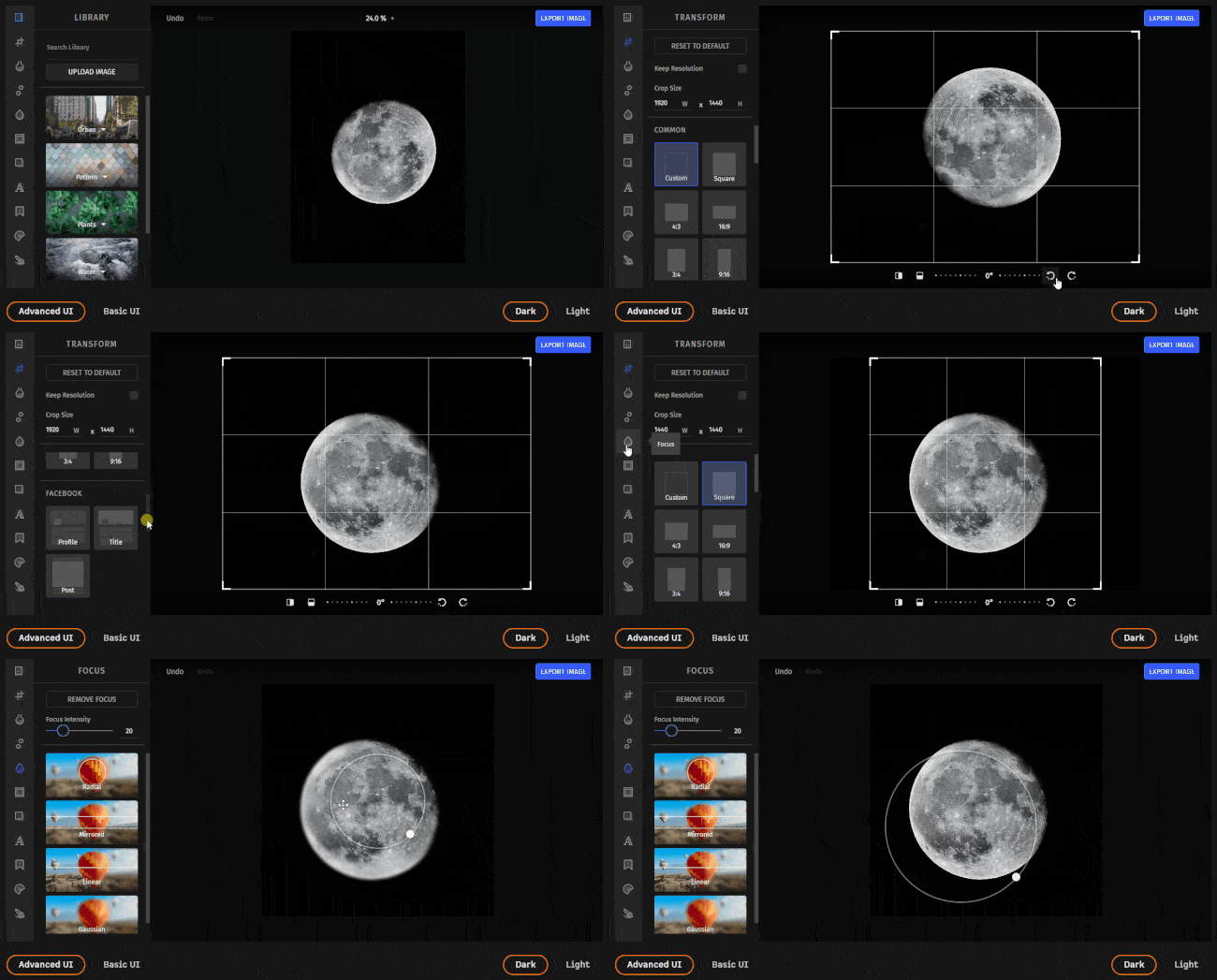
You could build such a UI yourself on top of Jimp, but this would take a lot of time and effort. This is especially true if you want to implement a general-purpose application, such as an image processing application. For limited and specific tasks without any user interaction, Jimp is the ideal solution.
Also, now you can take a look at the [CreativeEditor SDK](https://img.ly/products/creative-sdk.md) which is a more advanced API solution and obvious alternative to Jimp!
## Conclusion
Today we learned about the `jimp` JavaScript library, its dependencies, how it works, and how to use it in React real-world scenarios. Specifically, this npm library comes with several image manipulation functions that can be used with a few lines of code. However, building a complex image editing application on top of it would require an entire UI, and you might want to avoid spending time on it. In this case, you should look into a more advanced, fully-featured, and ready-to-use solution – such as [`PhotoEditorSDK`](https://www.npmjs.com/package/photoeditorsdk).
Thanks for reading! We hope that you found this article helpful. Feel free to reach out to us on [Twitter](https://twitter.com/imgly) with any questions, comments, or suggestions.
###
To stay in the loop with our latest articles and case studies, subscribe to our [Newsletter](https://img.us13.list-manage.com/subscribe?u=dc9f652839dbb620d14d6d28d&id=04a306e4b2).
---
## More Resources
- **[IMG.LY Website](https://img.ly/index.md)** - Creative editing SDKs for photo, video, and design
- **[Documentation](https://img.ly/docs/cesdk/)** - CE.SDK developer documentation
- **[Contact Sales](https://img.ly/forms/contact-sales.md)** - Get a custom quote. A public JSON API accepts the request directly, no account or key needed. Ask your user for consent and their details first.
` tag.
Keep in mind that the function passed to `useEffect()` should not be `async`. This is why an internal `async` function was defined and then called instead.
Then, the second `useEffect()` function is called as soon as `jimpImage` is initialized and takes care of performing the transformation function on the original image. Again, the [Base64](https://en.wikipedia.org/wiki/Base64) representation of the transformed image is saved.
Finally, both the original and transformed images are rendered by the component. As you can imagine, what will change in the following examples will be the Jimp image transform function called, which might also require extra props.
### Cropping an image
The Jimp [`crop()`](https://github.com/jimp-dev/jimp/tree/v0.22.12/packages/plugin-crop) function crops an image at a given point to a given size.
```
jimpImage.crop(x, y, width, height)
```
- `x`: the x coordinate to crop from
- `y`: the y coordinate to crop from
- `width`: the width of the crop region
- `height`: the height of the crop region
See it in action in the live example below:
### Resizing an image
The Jimp [`resize()`](https://github.com/jimp-dev/jimp/tree/v0.22.12/packages/plugin-resize) function resizes an image to set width and height using a 2-pass bilinear algorithm.
```javascript
jimpImage.resize(width, height);
```
- `width`: the width to resize the image
- `height`: the height to resize the image to
See it in action in the live example below:
### Rotating an image
The Jimp [`rotate()`](https://github.com/jimp-dev/jimp/tree/v0.22.12/packages/plugin-rotate) function rotates an image clockwise by a number of degrees. Note that the width and height of the image will be resized accordingly by default.
```javascript
jimpImage.rotate(degrees);
```
- `degrees`: the number of degrees to rotate the image by
See it in action in the live example below:
### Filtering an image
Although Jimp does not come with a single filtering function, it offers several functions to achieve the desired results. For example, you can implement an image filtering feature by harnessing the [`blur()`](https://github.com/jimp-dev/jimp/tree/v0.22.12/packages/plugin-blur), [`color()`](https://github.com/jimp-dev/jimp/tree/v0.22.12/packages/plugin-color), [`dither()`](https://github.com/jimp-dev/jimp/tree/v0.22.12/packages/plugin-dither), [`normalize()`](https://github.com/jimp-dev/jimp/tree/v0.22.12/packages/plugin-normalize), or [`threshold()`](https://github.com/jimp-dev/jimp/tree/v0.22.12/packages/plugin-threshold) functions.
Let’s see some of them in action in the live demo below:
## Jimp vs PhotoEditor SDK
Undoubtedly, Jimp is a powerful tool. It's an amazingly lightweight and simple library that offers so many image manipulations. On the other hand, achieving complex results requiring multiple manipulations to be performed on the end user's needs could become challenging. In detail, this would require an advanced, robust, reliable, and easy-to-use UI that only a commercial solution such as IMG.LY’s [PhotoEditor SDK](https://img.ly/products/photo-sdk.md) can offer.

You could build such a UI yourself on top of Jimp, but this would take a lot of time and effort. This is especially true if you want to implement a general-purpose application, such as an image processing application. For limited and specific tasks without any user interaction, Jimp is the ideal solution.
Also, now you can take a look at the [CreativeEditor SDK](https://img.ly/products/creative-sdk.md) which is a more advanced API solution and obvious alternative to Jimp!
## Conclusion
Today we learned about the `jimp` JavaScript library, its dependencies, how it works, and how to use it in React real-world scenarios. Specifically, this npm library comes with several image manipulation functions that can be used with a few lines of code. However, building a complex image editing application on top of it would require an entire UI, and you might want to avoid spending time on it. In this case, you should look into a more advanced, fully-featured, and ready-to-use solution – such as [`PhotoEditorSDK`](https://www.npmjs.com/package/photoeditorsdk).
Thanks for reading! We hope that you found this article helpful. Feel free to reach out to us on [Twitter](https://twitter.com/imgly) with any questions, comments, or suggestions.
###
To stay in the loop with our latest articles and case studies, subscribe to our [Newsletter](https://img.us13.list-manage.com/subscribe?u=dc9f652839dbb620d14d6d28d&id=04a306e4b2).
---
## More Resources
- **[IMG.LY Website](https://img.ly/index.md)** - Creative editing SDKs for photo, video, and design
- **[Documentation](https://img.ly/docs/cesdk/)** - CE.SDK developer documentation
- **[Contact Sales](https://img.ly/forms/contact-sales.md)** - Get a custom quote. A public JSON API accepts the request directly, no account or key needed. Ask your user for consent and their details first.