---
title: "CE.SDK v1.69 Release Notes"
description: "Agent Skills turns your AI coding assistant into a CE.SDK expert. Ship editors in minutes, not days. Plus Starter Kits, PPTX import, and video editor updates."
url: "https://img.ly/blog/creative-editor-sdk-v-1-69-0-release-notes/"
type: "blog"
date: "2026-02-27"
author: "Neslihan"
tags: ["Release Notes","CE.SDK","Agent Skills","Agentic Development","AI","Starter Kits"]
---
> This is the markdown version of [CE.SDK v1.69 Release Notes](https://img.ly/blog/creative-editor-sdk-v-1-69-0-release-notes/). For all pages in one file, see [llms-full.txt](https://img.ly/llms-full.txt). For an index of all available pages, see [llms.txt](https://img.ly/llms.txt).
---
**v1.69 is the biggest developer experience release we've shipped.** _Agent Skills_ collapse the time from idea to working editor from days to under a minute. Production-ready _Starter Kits_ eliminate days of boilerplate setup. _PPTX and Canva Importer_ lets users bring their existing designs directly into your editor. And a comprehensive video overhaul across Web, iOS, and Android closes the gap between CE.SDK and native professional editing apps.
Let's dive in!
---
## Introducing IMG.LY Agent Skills for CE.SDK
> **The biggest change to CE.SDK's developer experience since launch.**
AI agents have changed how developers build. With Agent _Skills_, CE.SDK works natively with your AI agent.
Install the plugin for Claude Code or Cursor and your AI coding agent becomes a CE.SDK expert with bundled access to guides, API references, and starter kits across 10 web frameworks. No external services, no MCP servers, no context-switching.
**What your developers can now do:**
- **`/cesdk:build`** — Describe a use case in plain language. The agent detects the framework, pulls the right starter kit, and scaffolds a working project autonomously.
- **`/cesdk:explain`** — Ask any CE.SDK implementation question and get answers adapted to the specific framework and experience level.
- **`/cesdk:docs-[framework]`** — Retrieve guides and API references directly from the IDE, without leaving the editor.
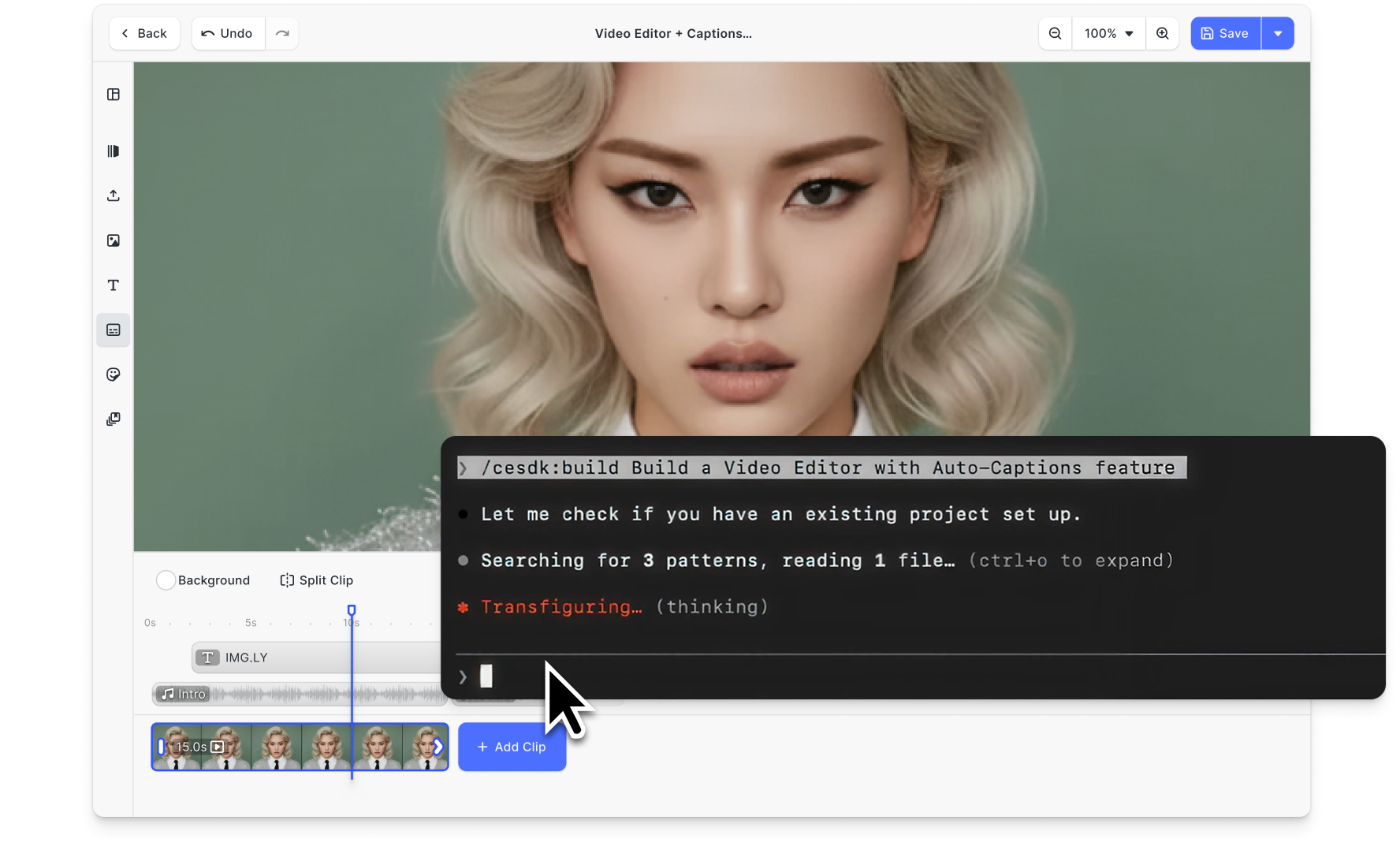
**For your product, this means:** developers prototype in minutes, not days. Non-technical team members can now build and extend functional editors independently. And onboarding new engineers to CE.SDK shrinks from a multi-day ramp to a single session.
→ [Quick Start & Full Announcement](https://img.ly/blog/img-ly-agent-skills-web.md)
→ [Explore Agent Skills Documentation](https://img.ly/docs/cesdk/js/get-started/agent-skills-f7g8h9.md?ref=img.ly)
---
## Launch in Minutes with Production-Ready Starter Kits for Web
Previously, getting CE.SDK running in a real product meant adapting complex demo projects: stripping features, adjusting architecture, and undoing assumptions baked into example code.
**Starter Kits replace all of that with pre-configured, production-ready editor UIs.**
Specialized kits for Photo, Video, and Design editors are scoped, clean, and immediately deployable. Each kit starts with a focused feature set. You explicitly opt in to what you need, so your UI stays performant and your users don't see capabilities they can't use.
**For your product, this means:** a functional, shippable editor in minutes rather than days of setup. Clean architecture from day one, without accumulating technical debt.
→ [Explore Starter Kit Documentation](https://img.ly/docs/cesdk/js/get-started/vanilla-js/quickstart-yef23s.md)
---
## Let Users Bring Their PPTX & Canva Designs to CE.SDK
Some customers don't start from scratch. They have existing creative assets locked inside PowerPoint and Canva, and until now, bringing those into CE.SDK required manual recreation.
The new PPTX Importer removes that barrier.
Users can import native PowerPoint files or export **Canva designs** as PPTX and bring them directly into your CE.SDK-powered editor, with layouts, elements, and structure intact.
→ [Try the PPTX Import Demo](https://img.ly/demos/pptx-template-import.md)
→ [View PPTX npm](https://www.npmjs.com/package/@imgly/pptx-importer)
---
## Professional-Grade Video Editing Across Platforms
This release expands CE.SDK's video features across web & mobile platforms.
**Control Video Speed (iOS & Android)**
Users can now adjust the playback speed of video and audio clips via a dedicated Speed UI. This has been one of the most-requested mobile features and is now available on both platforms.
→ [View Video Speed Documentation iOS](https://img.ly/docs/cesdk/ios/create-video/control-daba54.md#playback-speed)
→ [View Video Speed Documentation Android](https://img.ly/docs/cesdk/android/create-video/control-daba54.md#playback-speed)
**Create Video Groups in the Timeline (Web)**
Multiple clips can now be combined into a single manageable unit with synchronized timing, trimming, and a unified timeline representation.
This enables complex, multi-layer content production and speeds up the design process.
**Video Timeline Now Grows Automatically (Web)**
The timeline now automatically adjusts its height based on content. Manual track configuration is gone, and complex projects are easier to pick up for your new users.
**Use a Clutter-Free iOS Timeline (iOS)**
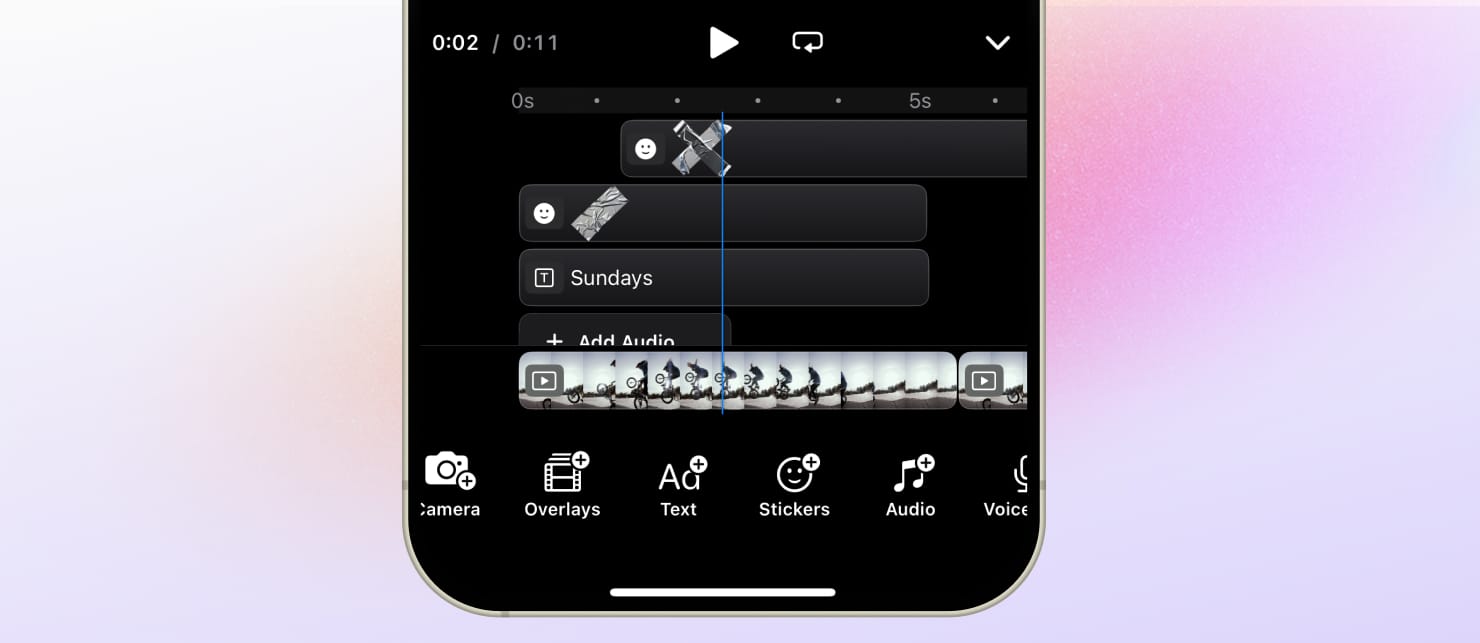
Non-video tracks now show a single thumbnail per clip, reducing clutter in multi-layer timelines on your iOS app.
---
## Full Changelog
See all technical details, breaking changes, and performance improvements in the [v1.69.0 Changelog.](https://img.ly/docs/cesdk/changelog/v1-69-0/)
_Thank you for building with IMG.LY._
---
## More Resources
- **[IMG.LY Website](https://img.ly/index.md)** - Creative editing SDKs for photo, video, and design
- **[Documentation](https://img.ly/docs/cesdk/)** - CE.SDK developer documentation
- **[Contact Sales](https://img.ly/forms/contact-sales.md)** - Get a custom quote. A public JSON API accepts the request directly, no account or key needed. Ask your user for consent and their details first.