---
title: "CE.SDK v1.43 Release Notes"
description: "Customize your Android Editor to fit your workflow! Easily rearrange the dock and inspector for a more efficient, responsive editing experience."
url: "https://img.ly/blog/creative-editor-sdk-v-1-43-0-release-notes/"
type: "blog"
date: "2025-02-03"
author: "Neslihan"
tags: ["Release Notes","Creative Editor","Android App Development"]
---
> This is the markdown version of [CE.SDK v1.43 Release Notes](https://img.ly/blog/creative-editor-sdk-v-1-43-0-release-notes/). For all pages in one file, see [llms-full.txt](https://img.ly/llms-full.txt). For an index of all available pages, see [llms.txt](https://img.ly/llms.txt).
---
Welcome to CE.SDK v1.43! This update brings you enhanced customization tools, allowing you to tailor the interface of your Android Editor to fit your workflow. With new possibilities for mobile configurations, you’ll enjoy a more flexible and responsive user experience. Let’s dive into what's new!
## Shape Your Interface Around Your Workflow
We’re excited to introduce powerful new ways to customize your **Editor on Android**. Easily configure your dock and inspector, giving you the flexibility to design a more personalized, responsive user experience!
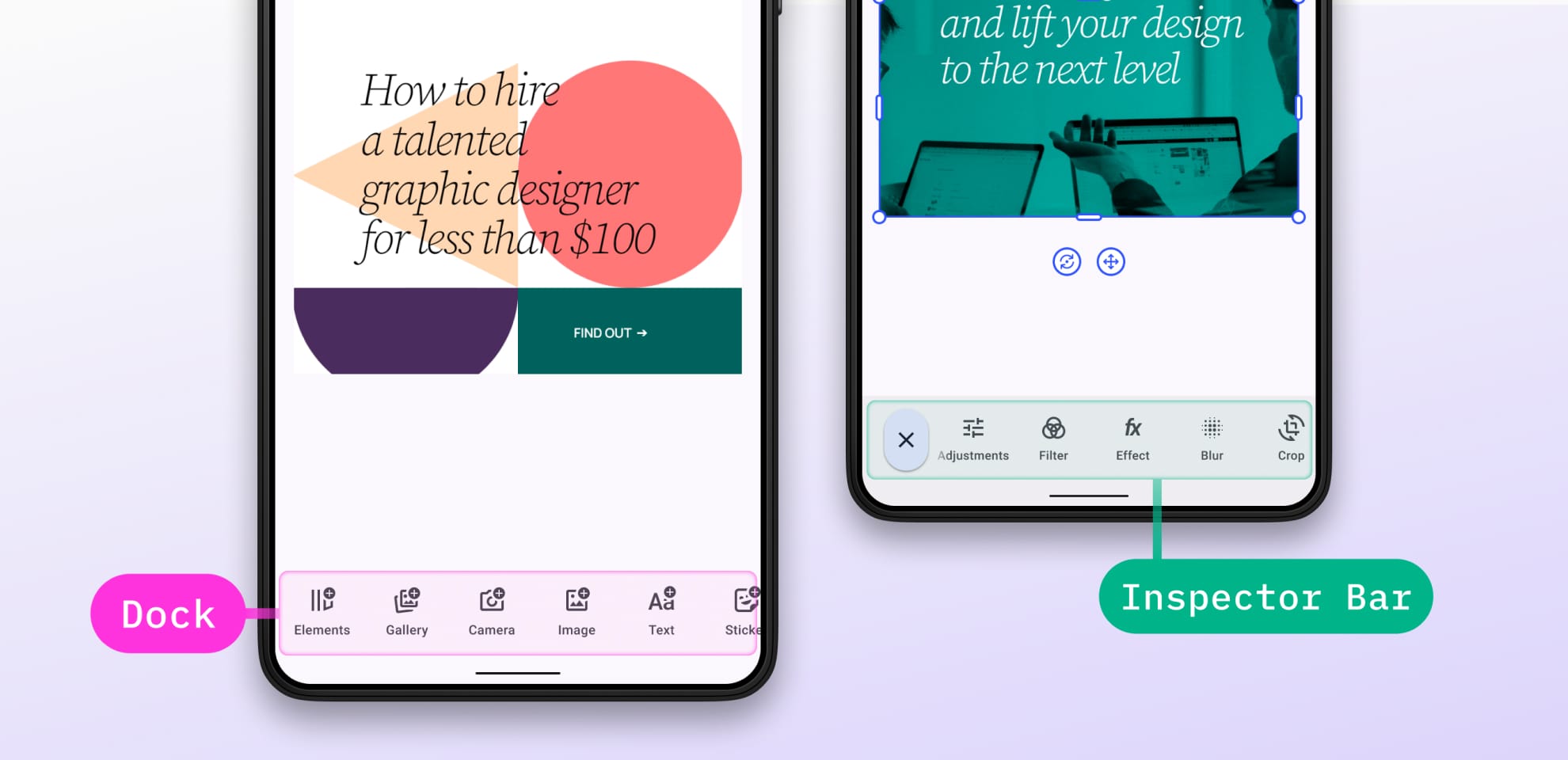
💡 The **dock** is where you keep essential tools for quick access, while the **inspector** provides detailed controls and settings for the selected item. What's New:
**Rearrange Your Dock**
Move and remove dock items freely while keeping your custom settings intact, like button height.
**Smart Custom Buttons**
For a more responsive workflow, add buttons that dynamically appear, change, or disappear based on your workflow, adapting to selected tools or active tasks.
**Real-Time Updates**
The dock updates in real-time, instantly reflecting changes to icons or visibility and adapting seamlessly to your workflow.
More customization options are coming soon! This update will be available on iOS shortly. Get started with our docs for [Inspector](https://img.ly/docs/cesdk/android/user-interface/customization/inspector-bar-8ca1cd.md?ref=img.ly#inspectorbaritem-configuration/?utm_source=imgly&utm_medium=blog&utm_campaign=releasenotes) and [Dock Configuration](https://img.ly/docs/cesdk/android/user-interface/customization/dock-cb916c.md?ref=img.ly#dock-configuration/?utm_source=imgly&utm_medium=blog&utm_campaign=releasenotes).
## Control How Images Fit into Blocks
This web feature is perfect for customizing how images appear in designs and templates, allowing for more precise control. With **Fill** **Mode** for images, you can choose from three options:
- **Crop**: Resizes and may crop the image to fill the block.
- **Cover**: The image fully covers the block while remaining centered both vertically and horizontally.
- **Fit**: Scales the image to fit within the block without cropping, leaving space if necessary.
Control this via API, with details in our [documentation](https://img.ly/docs/cesdk/js/edit-image/transform/crop-f67a47.md).
## Upcoming
**Streamline Your Video Editing Workflow**
Our next release makes web video creation smoother than ever! You will be able to add **multiple video clips** within a single track on your timeline, keeping your workspace organized and efficient. No more juggling extra tracks, just a clean, intuitive editing experience that lets you focus on bringing your vision to life.
View the [Changelog](https://img.ly/docs/cesdk/changelog/#v1430--january-21st-2025/?utm_source=imgly&utm_medium=blog&utm_campaign=releasenotes). Thanks for reading!
**3,000+ creative professionals gain early access to new features and updates. Don't miss out, and** [**subscribe**](https://share.hsforms.com/1IgAOV1wASXGPnFG4ZPLejg1hk3i?ref=img.ly) **to our newsletter.**
---
## More Resources
- **[IMG.LY Website](https://img.ly/index.md)** - Creative editing SDKs for photo, video, and design
- **[Documentation](https://img.ly/docs/cesdk/)** - CE.SDK developer documentation
- **[Contact Sales](https://img.ly/forms/contact-sales.md)** - Get a custom quote. A public JSON API accepts the request directly, no account or key needed. Ask your user for consent and their details first.