---
title: "CE.SDK v1.33 Release Notes"
description: "Explore new mobile design and photo editor configurations, plugins for UI customization, voiceover capabilities, and more."
url: "https://img.ly/blog/creative-editor-sdk-v-1-33-0-release-notes/"
type: "blog"
date: "2024-08-29"
author: "Neslihan"
tags: ["Release Notes","App Development","iOS App Development","Android App Development","Design Editor"]
---
> This is the markdown version of [CE.SDK v1.33 Release Notes](https://img.ly/blog/creative-editor-sdk-v-1-33-0-release-notes/). For all pages in one file, see [llms-full.txt](https://img.ly/llms-full.txt). For an index of all available pages, see [llms.txt](https://img.ly/llms.txt).
---
Welcome to the latest update of CE.SDK! We are bringing you new features that enhance your app's creative capabilities and user experience. This release includes Configurations for a Design Editor or Photo Editor on iOS and Android, Plugins, Voiceover Capabilities, and more.
With this release, you can:
## Integrate a Design Editor on iOS and Android
Get started with our new Design Editor configuration for iOS and Android. The out-of-the-box package is designed for easy creation and management of multipage designs.
Users can switch between editing and the page overview mode to review and adjust their work.
Keep the design process straightforward and efficient: the editor features a dock at the bottom, offering convenient access to essential tools like adding text, images, stickers, and uploading new assets. Additionally, you can insert a photo directly from your camera.
### **Key Features**
**Page Management**
Create and manage your design pages within a template. It’s easy to create fun carousel posts, as seen on Instagram and LinkedIn, or create a series. Head to the ‘Pages’ icon on the top right bar. In the page overview, you can create, duplicate, and edit a page. Lastly, you can change the order of pages by moving them up and down.
**Image Settings**
Selecting an image lets you fine-tune adjustment settings, and add filters, effects, or blur. Easily crop, straighten, rotate, or flip images.
[Try the Design Editor Configuration on iOS](https://apps.apple.com/us/app/img-ly-design-editor/id1672991141) and [Android](https://play.google.com/store/apps/details?id=ly.img.cesdk.catalog&pli=1).
## Use Plugins to Customize UI and Add Quick Actions
We're excited to introduce the first part of our plugin release for CE.SDK on the web: with this release, you can tailor the editor’s UI elements, reorder components, and add quick actions like **background removal.**
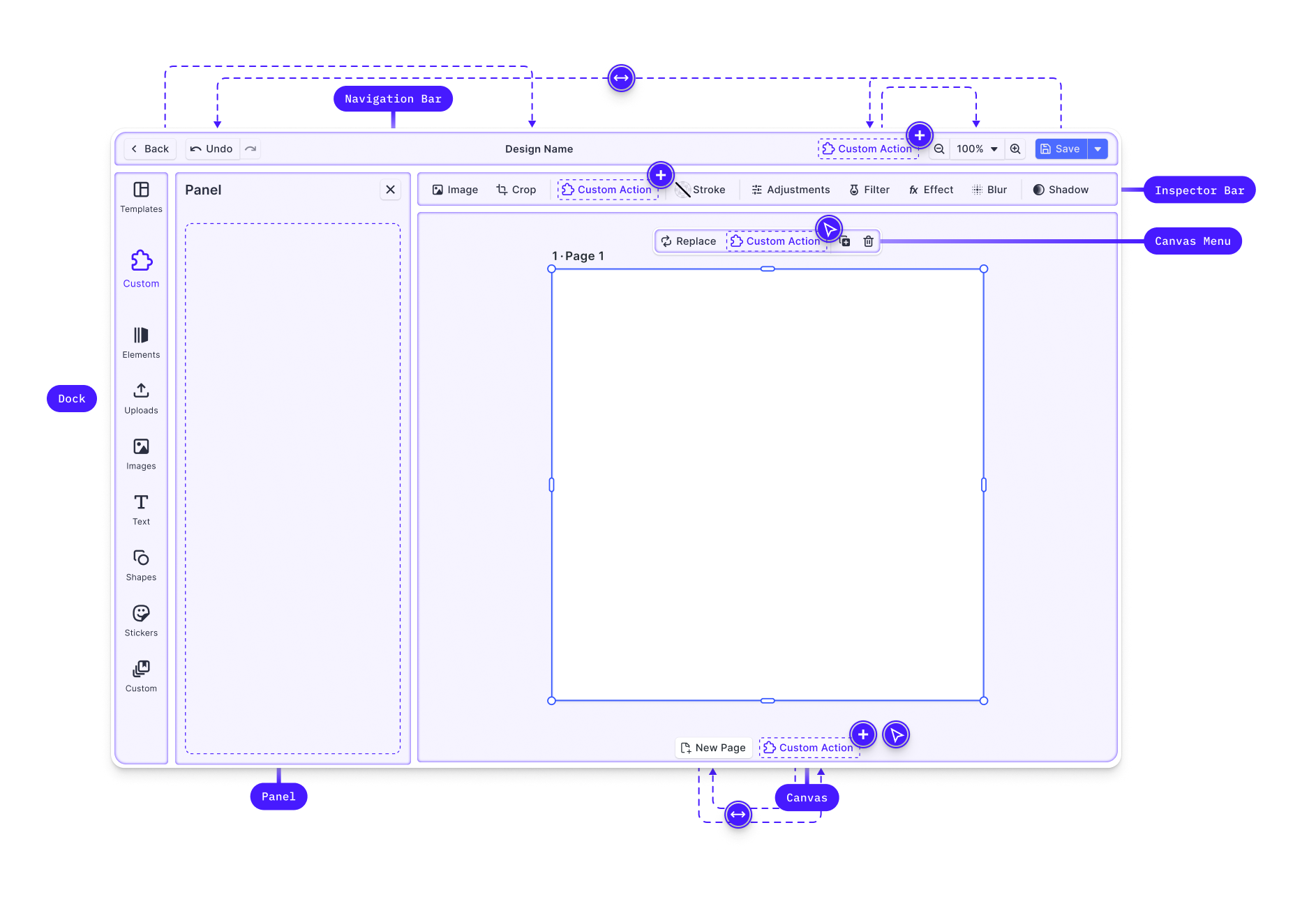
We’ve enabled extension points within key areas of the UI: the Canvas, Navigation bar, Inspector Bar, Dock, and Canvas Menu. Modify the appearance of existing features, register new components, and integrate quick actions. For example, you can add a "Background Removal" button directly in the Canvas Menu or create complex interactions like custom cut-out lines.
For more details on this first batch release and the upcoming plugins, please read our dedicated [article](https://img.ly/blog/plugin-release-part-1-customizing-the-ui-quick-actions.md?utm_source=imgly&utm_medium=blog&utm_campaign=releasenotes).
## Add Voiceovers to Videos on iOS
Add voiceover tracks directly within your mobile app, making your projects more dynamic and engaging. Whether creating a tutorial, narrating a slideshow, or adding commentary to a video, this feature allows you to seamlessly record, edit, and integrate voiceovers.
The popular feature, as enjoyed on TikTok and Instagram, is a staple for content creation and adds a personal touch to video creations.
To get started, navigate to “Add Audio”, select “Voiceover” section and start recording. You can preview the recording, re-record it, and add more audio, such as music. Adjust the audio levels for a balanced background track.
Try recording a voiceover with our Demo App for [iOS](https://apps.apple.com/us/app/img-ly-design-editor/id1672991141).
## Integrate a Photo Editor for iOS and Android
Our new **Photo Editor Configuration** is designed to offer an intuitive, out-of-the-box solution that bundles a range of key photo editing capabilities. Enhance individual photos, add text and shapes, or apply filters. This configuration is a kick-start to provide high-quality photo editing for iOS and Android with CE.SDK.
### Key Features
**Crop, Resize**
Crop, straighten, flip, resize, and rotate your photos.
**Adjustments**
Fine-tune your photos by adjusting brightness, contrast, and other key settings, ensuring your images look their best.
**Text, Shapes, and Stickers**
Enhance your photos by adding and customizing text, shapes, and stickers. Whether you're creating eye-catching titles, intricate shapes, or playful stickers, our configuration gives you the flexibility to adjust fonts, font colors, sizes, and positions to perfectly match your vision.
**Effects, Filters, Blur, Blending Modes**
Transform your images with fun effects, blur, and filters. Apply overlays to add depth and texture to your photos by adjusting blend modes and opacity to achieve the perfect effect.
Additionally, use our range of photo filters to set the mood, from warm and nostalgic tones to vibrant, modern effects, giving your images a distinctive and professional look.
Check our [documentation](https://img.ly/docs/cesdk/ios/prebuilt-solutions/photo-editor-42ccb2/?utm_source=imgly&utm_medium=blog&utm_campaign=releasenotes) to get started with our photo editor configuration, or [try the photo editor on iOS](https://apps.apple.com/us/app/img-ly-design-editor/id1672991141) and [Android](https://play.google.com/store/apps/details?id=ly.img.cesdk.catalog&pli=1).
## Improvements
**Preview Audio on iOS and Android**
We’ve made it easier to select the perfect audio clip for your projects. Listen to audio tracks directly within the interface before adding them to your video. Tap the play button of an audio clip in the asset library to preview it, and adjust your audio clip within the timeline.
**Resize Pages**
Resize pages in your web editor by simply grabbing corners and side handles, moving beyond the limitations of input fields or preset format sizes. This intuitive resizing integrates seamlessly with other adjustments, such as image cropping, ensuring a smooth workflow. Enable or disable this behavior as needed.
**Create Rounded Corners**
You can now easily create rounded corners for images on the web, iOS and Android. Within your designs, you can add a sleek and modern touch to your projects.
**Drag and Select Multiple Elements**
You can now click and drag with your mouse to draw a selection rectangle, instantly selecting all blocks within the covered area. This feature saves you time and effort, working with complex templates.
Thanks for reading! Don’t hesitate to [reach out](https://img.ly/forms/contact-sales.md) if you have any questions or need assistance.
**Over 3,000 creative professionals gain early access to our new features, demos, and updates. Don't miss out, and** [**subscribe**](https://share.hsforms.com/1IgAOV1wASXGPnFG4ZPLejg1hk3i) **to our newsletter.**
---
_Please note that these release notes also include improvements from previous versions._
---
## More Resources
- **[IMG.LY Website](https://img.ly/index.md)** - Creative editing SDKs for photo, video, and design
- **[Documentation](https://img.ly/docs/cesdk/)** - CE.SDK developer documentation
- **[Contact Sales](https://img.ly/forms/contact-sales.md)** - Get a custom quote. A public JSON API accepts the request directly, no account or key needed. Ask your user for consent and their details first.